How do I set up my online store?
Switch on the shop for a website and choose its pricing, currency, checkout, review and cart-recovery settings.
Your online store runs on your website. Each website you sell from is a storefront with its own shop settings, so two sites can price, check out and recover carts differently.
Open the storefront settings
Go to Ecommerce → Storefronts and open your website. It opens on the Shop tab. (You can also reach it from Ecommerce → Setup → Storefronts.)
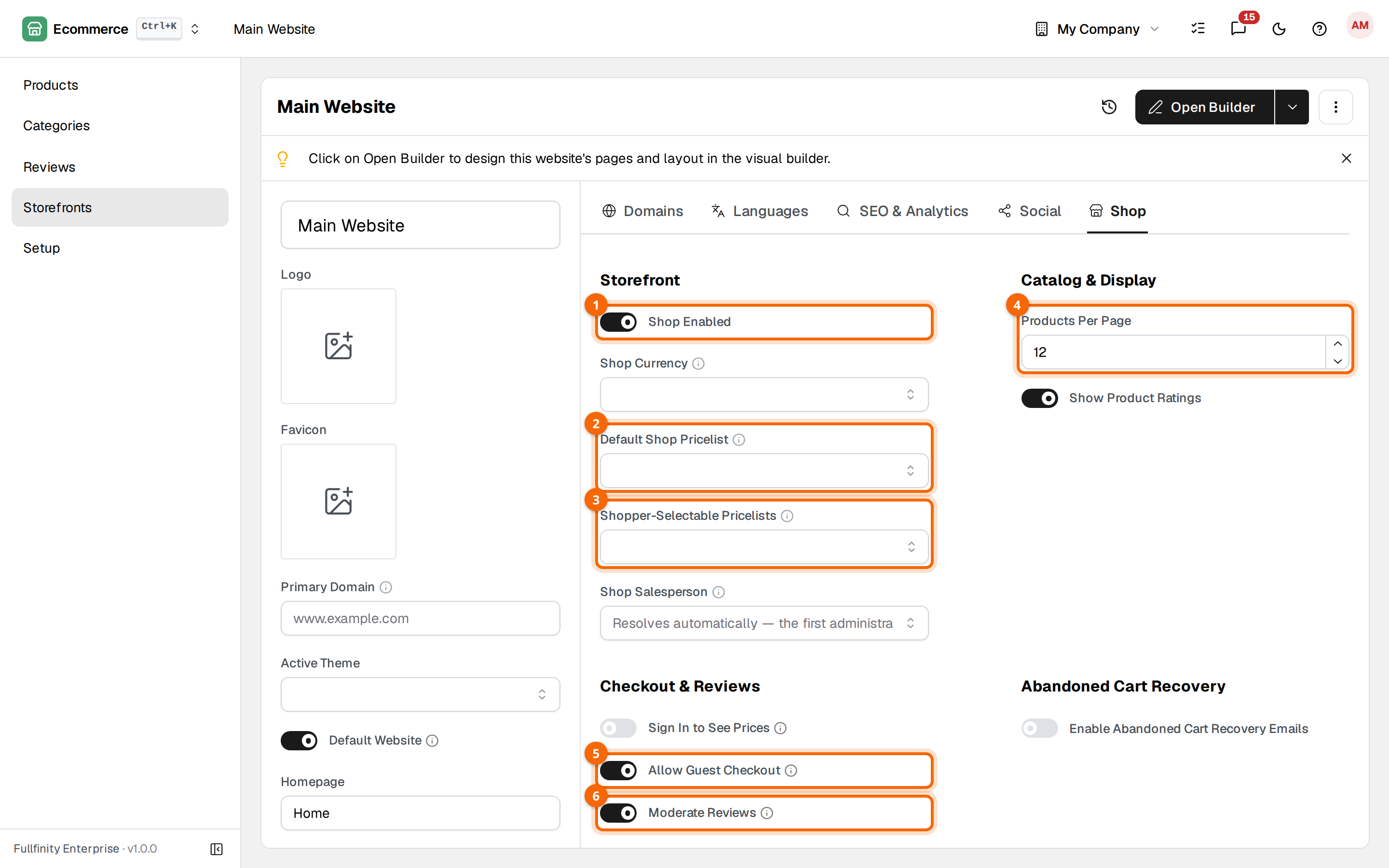
Storefront
| Setting | What it does |
|---|---|
| Shop Enabled (1) | Turns the shop on for this website. Off, the shop pages aren't available. |
| Default Shop Pricelist (2) | The prices shown to guests and to customers who don't have their own pricelist. |
| Shopper-Selectable Pricelists (3) | Pricelists a visitor may switch between in the site header. Each has its own currency, so this is also how shoppers choose the currency they pay in. Leave it empty and no selector is shown. |
| Shop Currency | Only used when no pricelist gives a currency. |
| Shop Salesperson | Who online orders are credited to when the customer has no account manager. Empty, the first administrator is used. |
Catalog & Display
Products Per Page (4) sets how many products the shop shows on each page. Show Product Ratings shows the star rating on product cards and pages.
Checkout & Reviews
- Sign In to See Prices — hides prices and the add-to-cart button from visitors who aren't signed in. Products can still be browsed. With this on, guest checkout isn't possible, so its switch disappears.
- Allow Guest Checkout (5) — lets shoppers buy without creating an account.
- Moderate Reviews (6) — new product reviews wait for your approval before they appear. See How do I moderate product reviews?
Abandoned Cart Recovery
Switch on Enable Abandoned Cart Recovery Emails to email shoppers who left items in their cart. Abandoned Cart Delay (minutes) sets how long a cart must sit untouched first, and Recovery Email Template the email they get — empty, the built-in recovery email is sent.
Company-wide shop settings
Ecommerce → Setup holds the settings shared by all your storefronts: Stock Management (see How do I stop customers ordering items that are out of stock?) and a link to Pricelists.
What's next
- Put products in the shop: How do I publish products and organize shop categories?
- Charge for delivery: How do I charge shipping at checkout?
- What happens when an order comes in: What happens after a customer orders on my website?