How do I set up a salary structure?
List the parts pay is made of — basic salary, allowances, deductions, employer contributions — and how each is worked out.
A salary structure is the recipe for a payslip: the components pay is built from, in order. Employees on the same terms share one structure; each person's own figures go on their contract.
Go to Employees → Setup and click Salary Structures. Open a structure, or click New and name it.
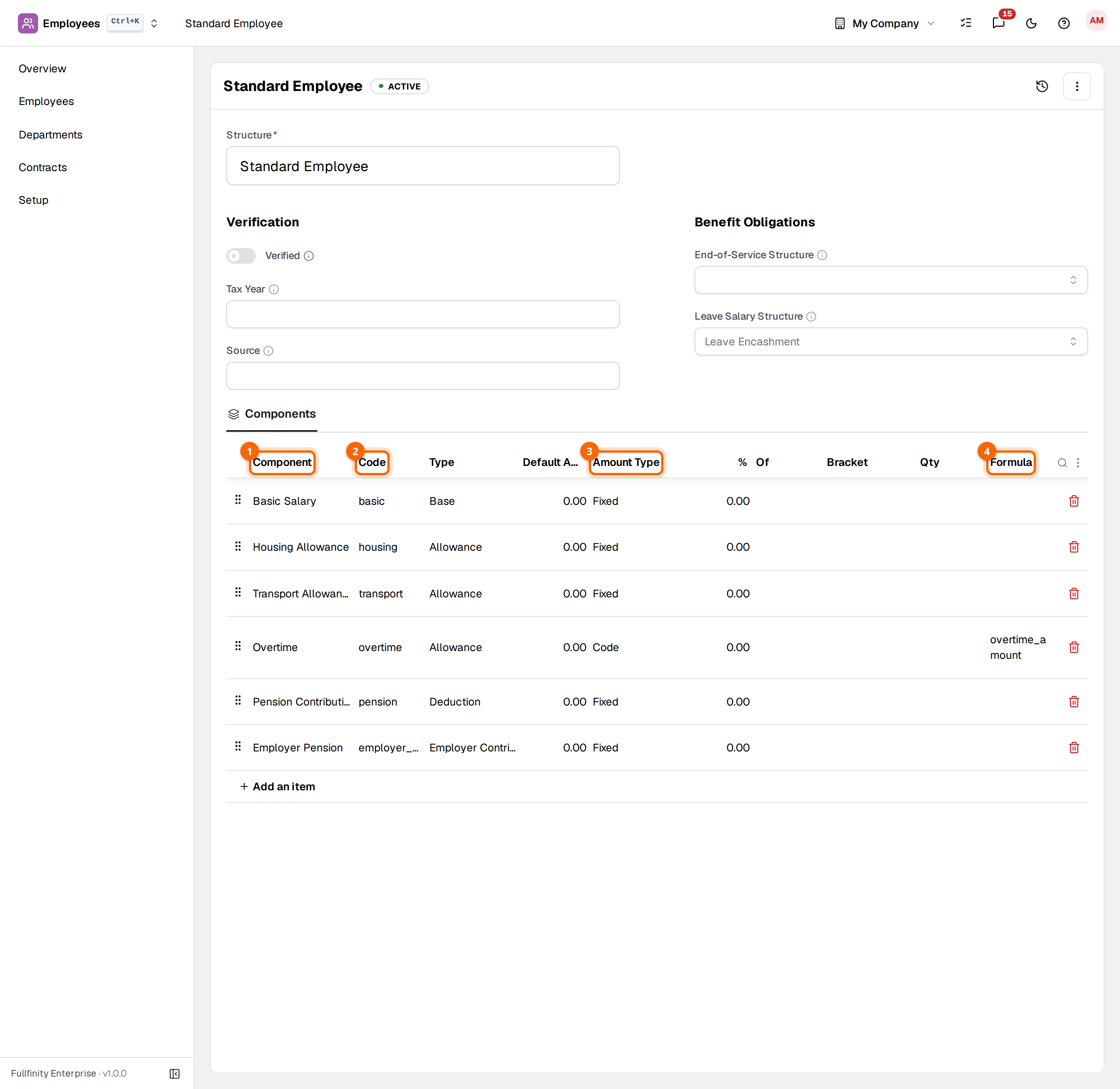
On the Components tab, click Add an item for each component:
- Component — its name on the payslip, such as Housing Allowance. Set its Type: Base and Allowance add to gross pay, a Deduction is taken off it, an Employer Contribution is a cost to you that doesn't change the employee's net pay.
- Code — a short name without spaces, such as housing. Later components can use it in their own calculation.
- Amount Type — how the amount is worked out (below).
- Formula — the calculation, for the Code amount type.
| Amount Type | The amount is |
|---|---|
| Fixed | A set figure — each employee's own, entered on their contract (or the Default Amount). |
| Percentage | A percentage (%) of another component's code, or of the wage — such as a pension of 5% of basic. |
| Bracket | A tax table applied to an amount — see How do I use my country's tax rules in payroll? |
| Quantity × Rate | A quantity (Qty), such as hours of overtime, times a rate. |
| Code | A formula. It can use the earlier components' codes, the amounts the employee's contract states for its fixed components (such as basic, even in an end-of-service structure), the period's figures — wage, working_days, paid_days, worked_hours, hourly_rate, overtime_hours, overtime_amount — your payslip input types, such as bonus, and your tax tables. |
Two formulas worth knowing:
- wage * paid_days / working_days — the salary reduced for unpaid time off.
- overtime_amount — the approved overtime for the period, valued at each claim's category rate. Without a component like this, approved overtime is shown on the payslip but not paid.
Drag the rows into the order they should be calculated: a component can only use the codes above it.
A formula is checked when you save: a name that isn't one of these — a misspelt code, or an input type that hasn't been added — is refused, and the message names it.