How do I close the register and count the cash?
End the shift, count the drawer against the expected cash, and see what closing books to your accounts.
Close the register at the end of every shift. Closing counts the drawer, records any difference, and books the shift's sales and payments to your accounts in one entry.
Click the ⋮ button at the top right and choose Close session.
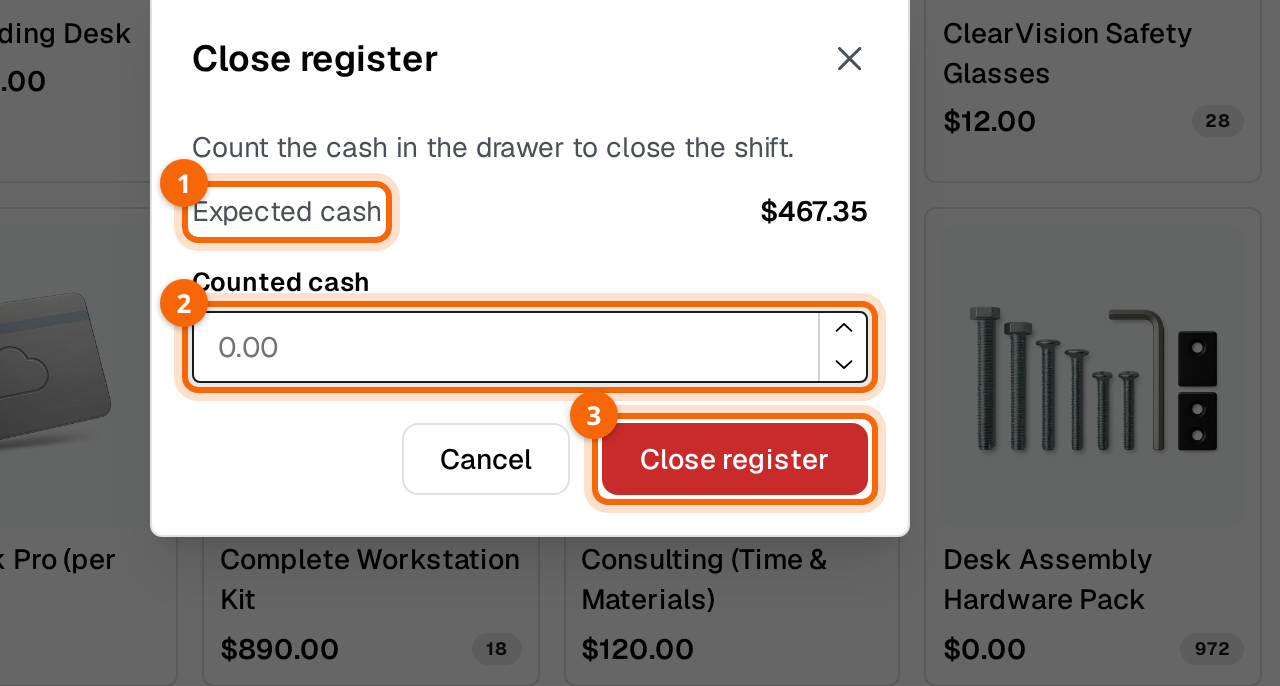
- Expected cash — what the drawer should hold: the opening float, plus cash sales less change, plus cash paid in, less cash paid out and cash refunds.
- Count the drawer and enter the total. Over / short shows the difference as you type — green when there is more than expected, red when there is less.
- Click Close register.
You're taken back to the list of registers, and the register shows Closed.
What closing books
One journal entry for the whole shift: your sales and their tax, each payment method's takings in its journal, gift cards sold as a liability, tips as money owed to staff, cash rounding, and the count difference to the cash difference account. Sales billed on account were already booked by their invoices. Card payments taken offline still have to be matched to your provider's statement — see What happens when the register goes offline?
To look back at a closed shift, see How do I review past shifts and register sales?