How do I follow up a request that hasn't been signed?
See who has signed, remind the others, and cancel or reopen a request.
A sent request shows where it stands on its own screen and in Sign → Documents, where Awaiting Signature and Completed at the top count your requests.
| Status | Means |
|---|---|
| Sent | Emailed; nobody has signed yet. |
| Partially Signed | Some signers have signed. |
| Completed | Everyone signed; the signed PDF is ready. |
| Declined | A signer refused. Nobody else can sign it. |
| Expired | The Expires On date passed before everyone signed. |
| Cancelled | You withdrew it. |
Who has signed
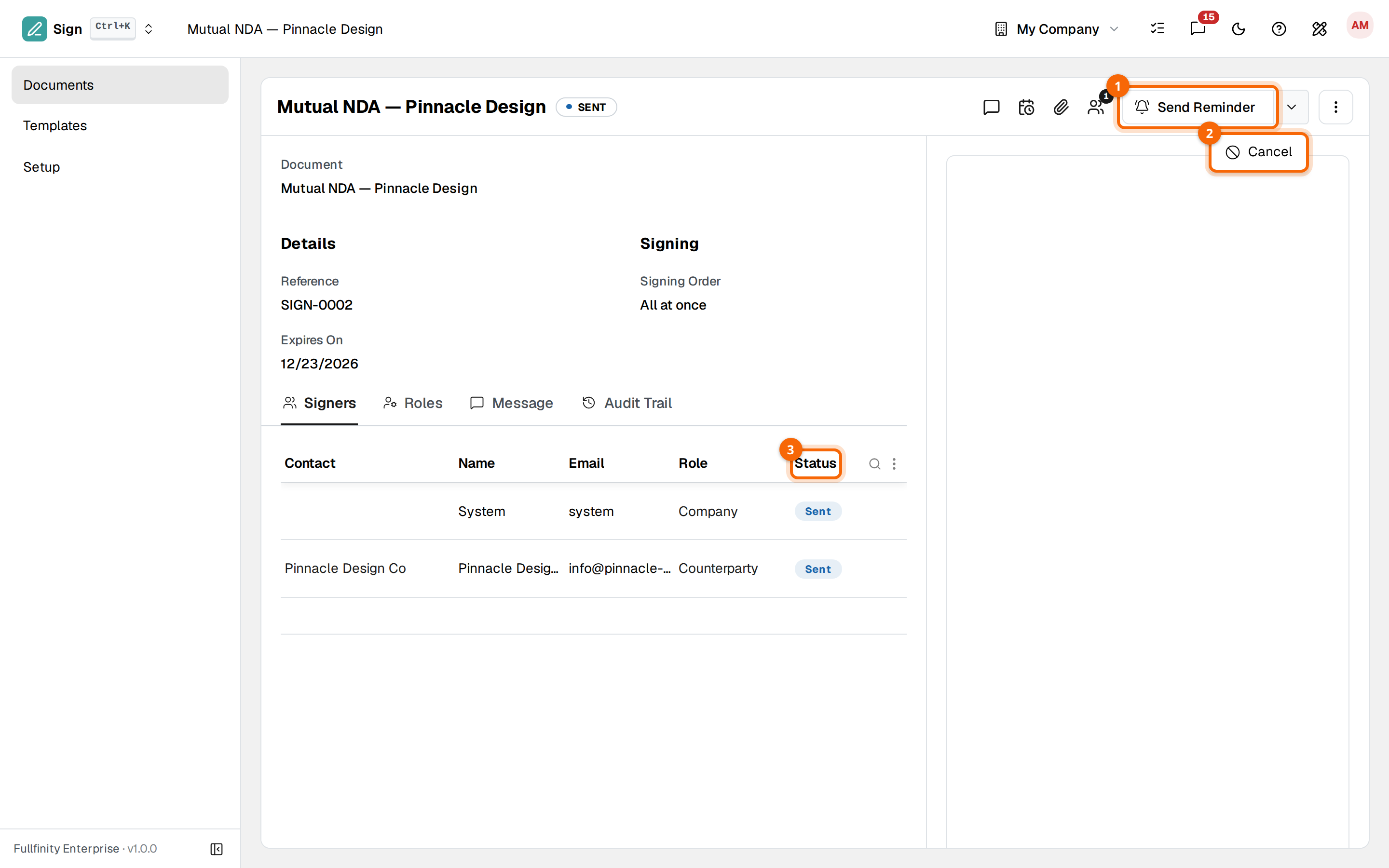
Open the request. On the Signers tab each signer's Status is Pending (not invited yet — they sign later in the order), Sent, Viewed (they opened the link), Signed or Declined. The Audit Trail tab lists every event with its time.
Remind them
Click Send Reminder to email the signing link again to everyone who has it and hasn't signed. Reminders also go out by themselves every few days, as set in Reminder Cadence — see How do I set up Sign?
Cancel or start again
Cancel withdraws the request: the links stop working. To change and resend a cancelled, declined or expired request, click Reset to Draft, correct it and click Send — the signers are emailed again. A completed request can't be cancelled or reopened.