How do I set budgets and compare them with actuals?
Plan an amount per department, project or other dimension value for a period, and Fullfinity shows what was actually booked and the percentage achieved.
A budget sets a planned amount for each of your departments, projects or other dimension values over a period — a year, a quarter. Fullfinity adds up what was actually posted to each of them in that period, so you see planned against actual as you go.
Create a budget
- Go to Accounting → Budgets and click New.
- Name it, such as Operating Budget 2026, and set From and To. They start on your current fiscal year.
- Add a line per dimension value: choose the Dimension Value, the Type — Cost for planned spend (the default) or Income for planned earnings — and type the Planned amount as a positive figure.
- Save, then click Confirm.
Read it
Each line shows Practical — what that value actually spent (a Cost line) or earned (an Income line) between the budget's dates — and Achievement %, practical as a percentage of planned. Both update as new documents are posted; only posted documents and entries count.
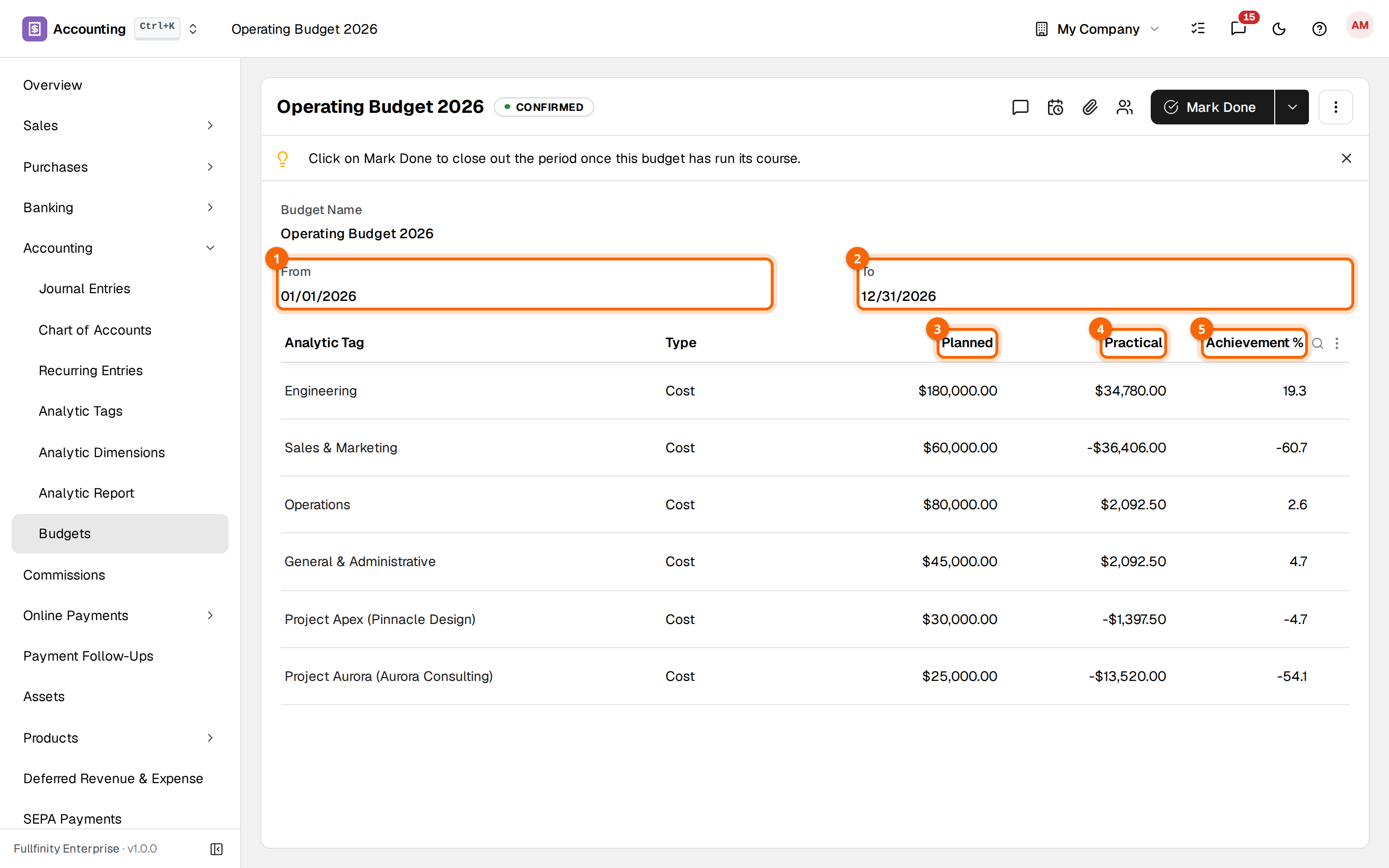
Click Mark Done when the period is over. Reset to Draft reopens a budget for changes.