How do I add an applicant?
Record a candidate with their CV, the position they applied for and how to reach them.
Every candidate is an applicant: one record holding their CV, contact details and how far they have got.
Go to Recruitment → Applicants and click New.
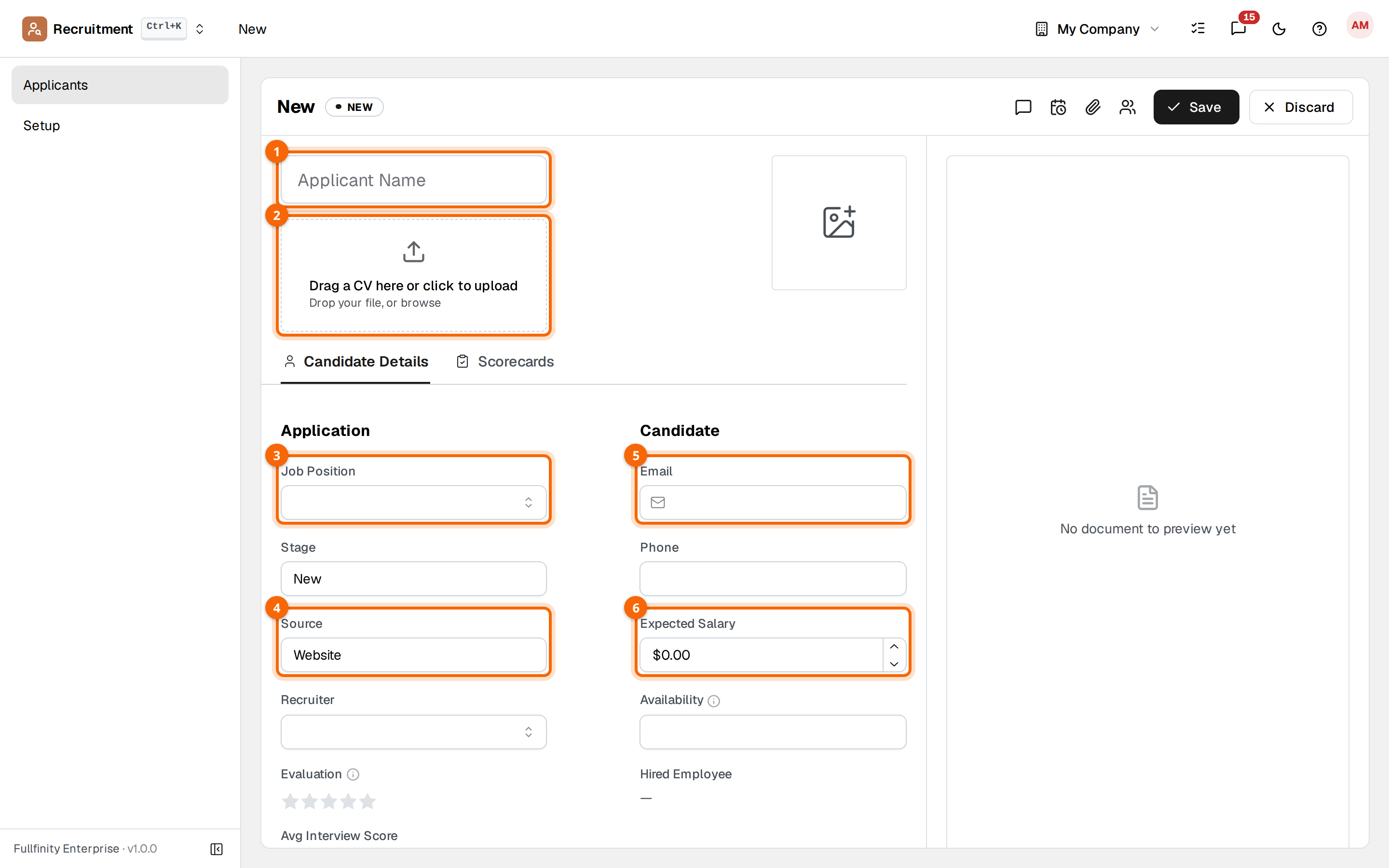
- Applicant Name — the candidate's name. The only required field.
- The CV — drag the PDF onto the box, or click it to choose the file. It is shown beside the form, so you can read it while you work.
- Job Position — what they applied for.
- Source — where they came from: Website, Referral, Agency, LinkedIn or Other.
- Email — and their Phone.
- Expected Salary — what they asked for. Note their notice period under Availability.
Click Save. The applicant gets a reference such as APP-2026-00014, and starts in the first stage, New. Pick who handles them under Recruiter. Add a photo by clicking the picture placeholder.
Use Evaluation for your own overall impression, from one to five stars. Avg Interview Score fills in from the interviewers' scorecards.
➡️ Next: How do I move applicants through the hiring stages?
Was this article helpful?