How do I connect an SMS or WhatsApp provider?
Connect your Twilio account so you can send SMS and WhatsApp messages and receive replies.
Fullfinity sends text messages through your own account with a messaging provider — you pay the provider for what you send. The provider available today is Twilio, for SMS and WhatsApp. You need the Messaging app installed and a Twilio account with a phone number.
1. Install Twilio
Open the Integrations app, find Twilio Messaging and click Install. Then open it.
2. Enter your Twilio details
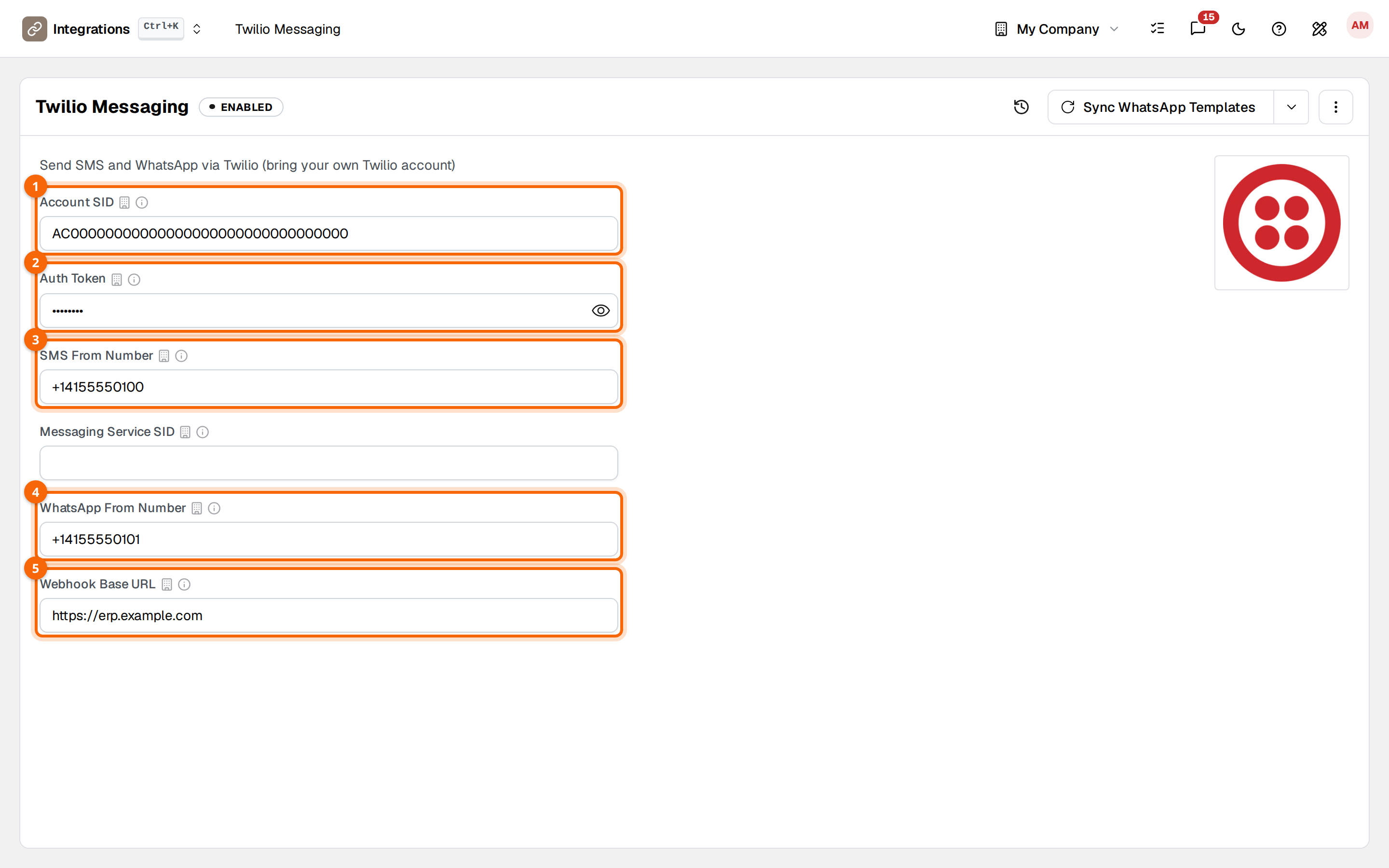
- Account SID and
- Auth Token — from the Twilio Console.
- SMS From Number — your Twilio number, written with the country code: +14155551234. Or fill in Messaging Service SID to send through a Twilio Messaging Service instead.
- WhatsApp From Number — your WhatsApp sender, same format. Leave it empty if you only send SMS; WhatsApp is offered only when it is filled in.
- Webhook Base URL — the public address of your Fullfinity, such as https://erp.example.com. Twilio uses it to report delivery and pass on replies.
Click Enable. Each company enters its own details.
With WhatsApp set up, a Sync WhatsApp Templates button appears on the integration — see How do I use WhatsApp templates?
Was this article helpful?