How do I scrap a component damaged during production?
Write off a component that broke while an order was being built, and keep a record of it on the order.
When a component is damaged while an order is being built, scrap it from the order. It leaves stock, the order counts it, and your scrap rate shows how often it happens.
- Open the confirmed or in-progress order, open its action menu and click Scrap.
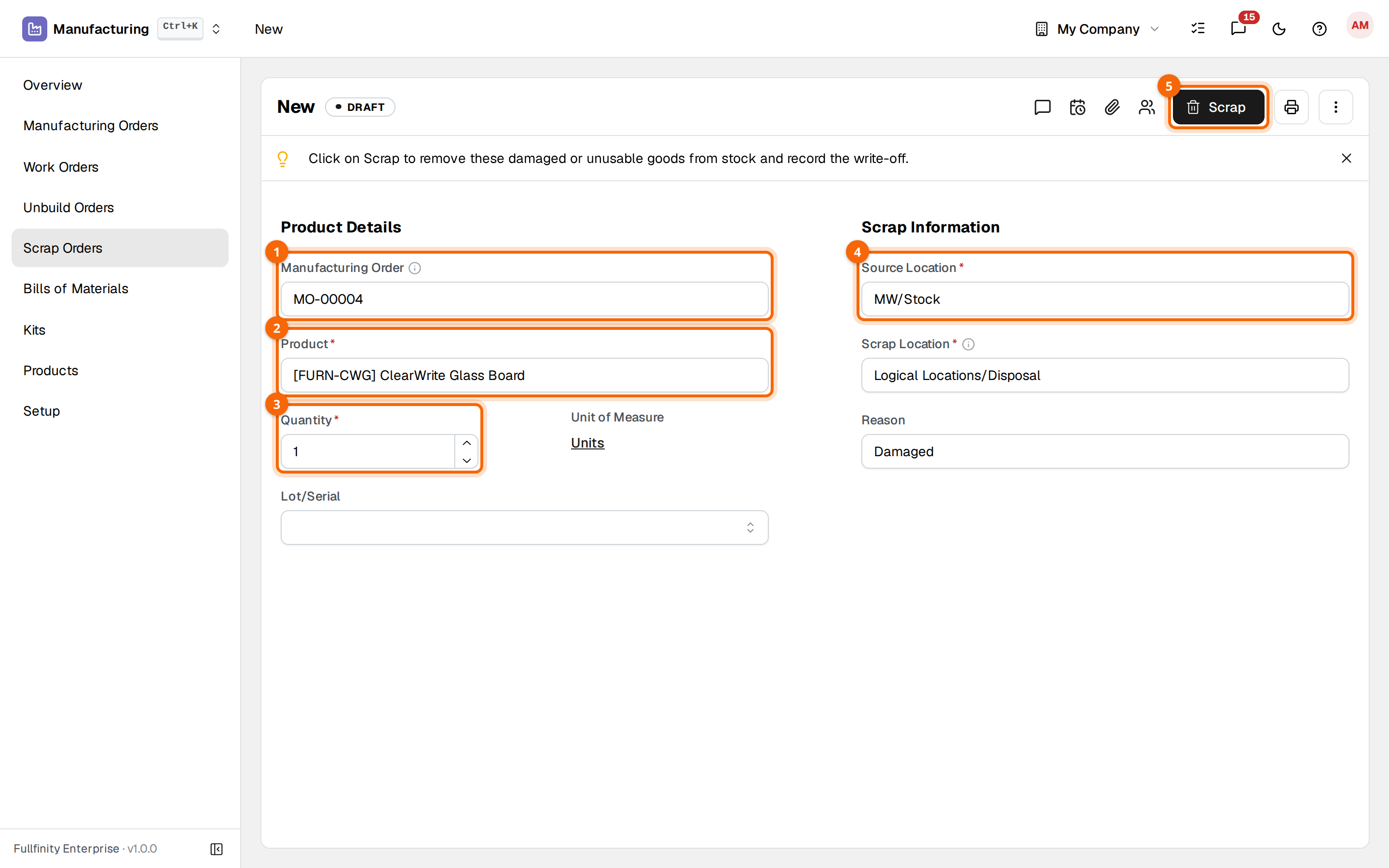
- A new scrap opens with the Manufacturing Order (1) and the Source Location (4) the order takes its components from already filled in.
- Choose the Product (2) that was damaged and the Quantity (3). For a tracked product, pick the Lot/Serial.
- Pick a Reason, click Save, then Scrap (5).
What happens next
- The damaged units leave stock. If they were reserved for the order, the order is now short of them: use Reserve Stock on the order to set aside replacements.
- The order gets a Scraps button that lists its scraps.
- The Scrap Rate at the top of Manufacturing → Manufacturing Orders shows how many finished orders had scrap.
Every scrap, from production or the warehouse, is listed in Manufacturing → Scrap Orders. Related: How do I scrap damaged or expired stock?
Was this article helpful?