How do I keep manufactured products in stock automatically?
Use a replenishment rule to raise manufacturing orders whenever a product you make runs low.
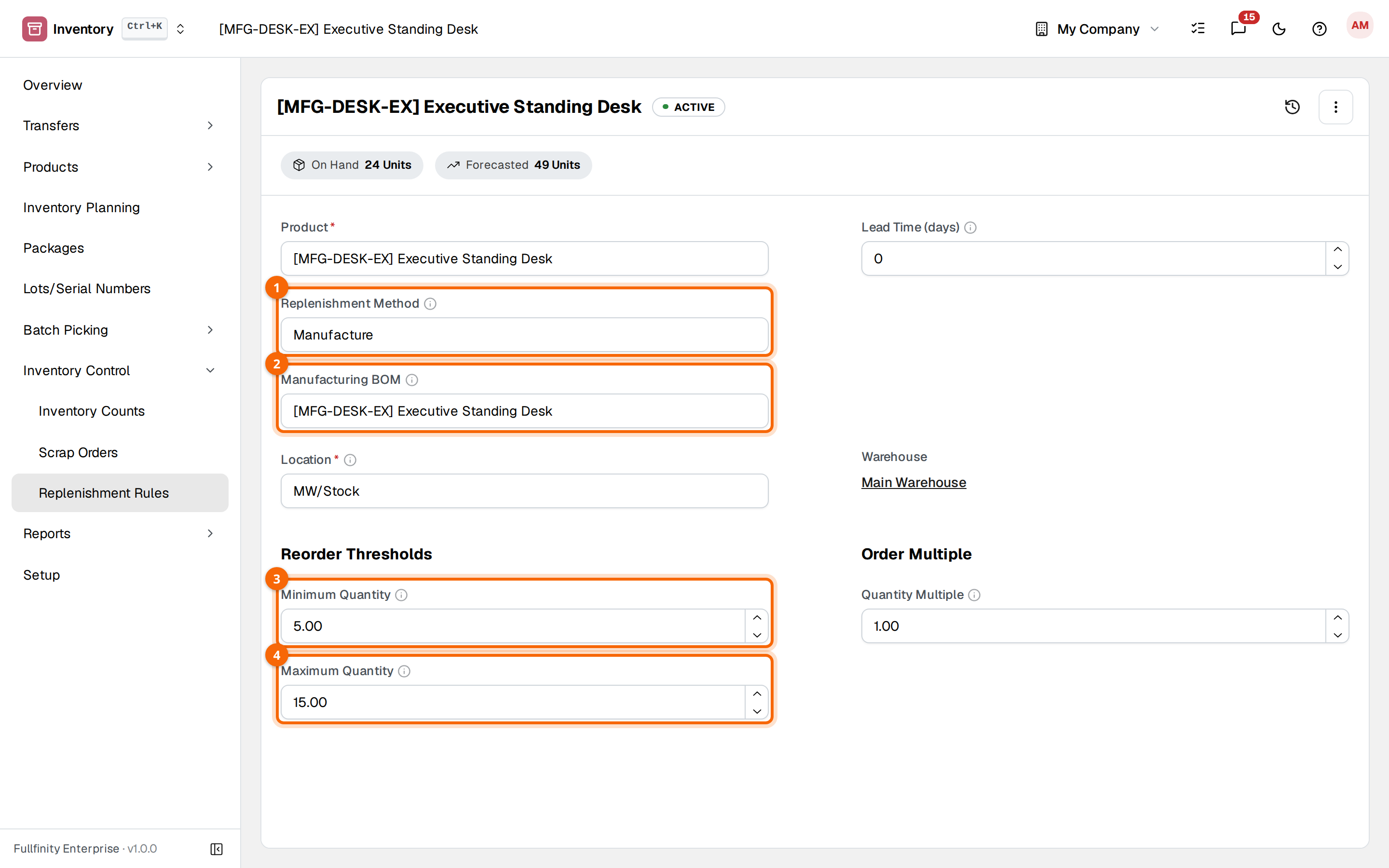
A replenishment rule with the Manufacture method keeps a product you make between a minimum and a maximum: when it runs low, a manufacturing order is raised to build it back up.
- Go to Inventory → Inventory Control → Replenishment Rules and click New.
- Choose the Product and the Location to keep stocked.
- Set the Replenishment Method (1) to Manufacture.
- Leave Manufacturing BOM (2) empty to use the product's usual bill, or choose a particular one.
- Set the Minimum Quantity (3) to reorder at and the Maximum Quantity (4) to build up to. Click Save.
When orders are raised
- Once a day, every rule whose forecasted quantity is below its minimum gets a manufacturing order for the difference up to the maximum. Click Run Replenishment on a rule to do it now.
- Manufacturing orders already open for the product count as on their way, so a rule doesn't raise a second one while the first is still being built.
- The orders are confirmed and scheduled to start the product's Manufacturing Lead Time (days) before the stock is needed.
More on rules: How do I reorder automatically (replenishment rules)?
Was this article helpful?