How do I set up Fleet?
Choose your distance and fuel units, how early renewals are flagged, and the vehicle models you run.
Fleet keeps your vehicles: who drives them, fuel, leases, insurance and road tax, and what each one costs. A vehicle is a piece of equipment as far as Maintenance is concerned, so servicing it works the same way as for any machine.
Settings
Go to Fleet → Setup.
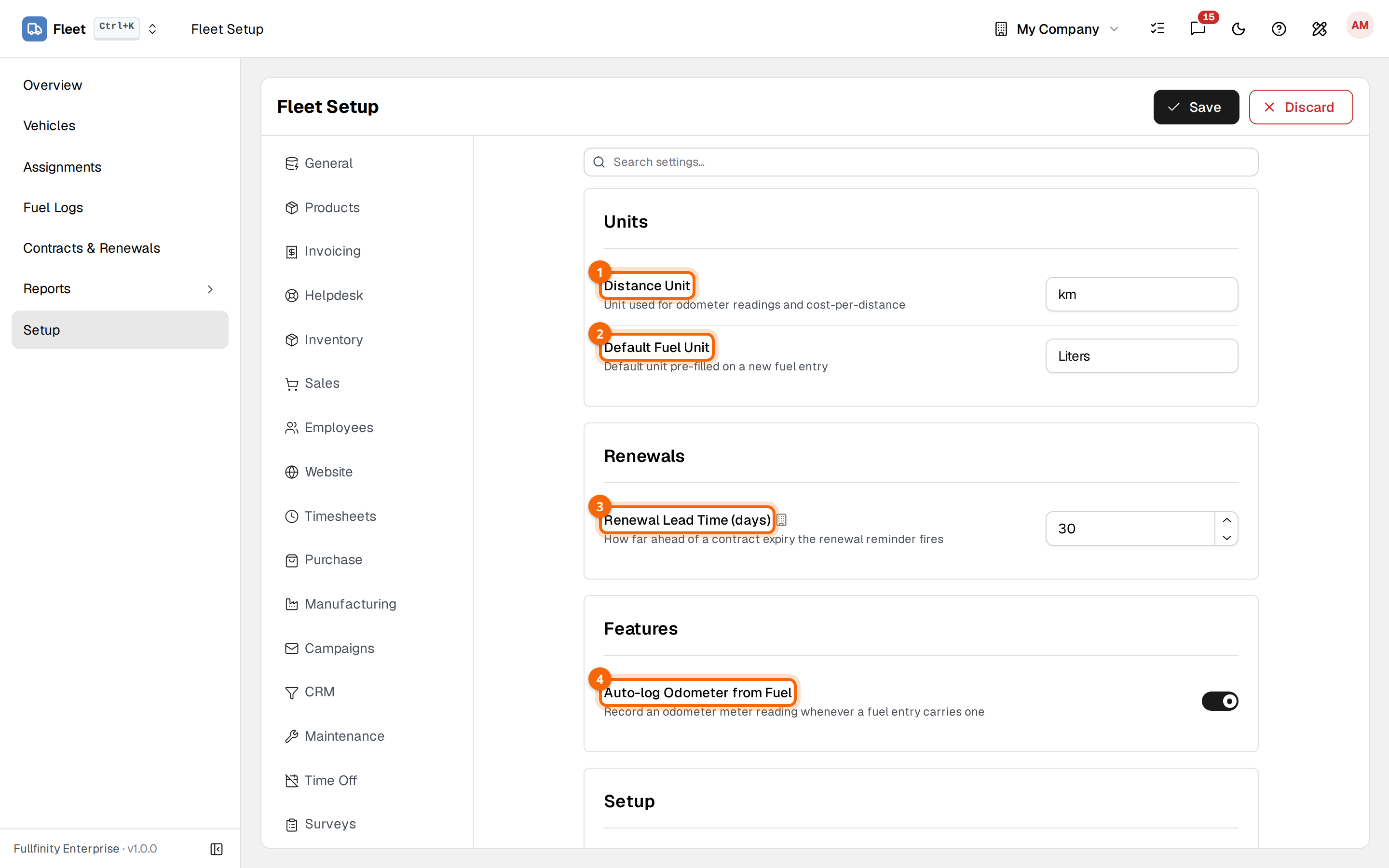
- Distance Unit — km or mi. New vehicles count their odometer in it.
- Default Fuel Unit — Liters, Gallons or kWh, filled in on each new fuel entry.
- Renewal Lead Time (days) — how long before a contract runs out its renewal reminder is sent.
- Auto-log Odometer from Fuel — a fuel entry's odometer reading is added to the vehicle's odometer history, which keeps usage-based servicing up to date with no extra typing.
Click Save.
Vehicle models
Under Setup, Vehicle Models is your catalogue of makes and models — Ford Transit 350, Nissan Leaf — with each one's Fuel Type, Transmission, Seats and Default Category. Choosing a model on a vehicle fills in its fuel type, transmission and seats, and a new vehicle is filed under the model's category.
Access
Fleet has User and Manager roles. Managers change the settings and receive the renewal reminders for vehicles nobody else looks after. See How do I add users and choose what they can access?