How do I keep track of leases, insurance and renewals?
Record a vehicle's contracts with their expiry dates, and get a reminder before each one runs out.
Leases, loans, insurance, registration, road tax and inspections all have a date by which something must be renewed. Record them as contracts and Fleet reminds you in time.
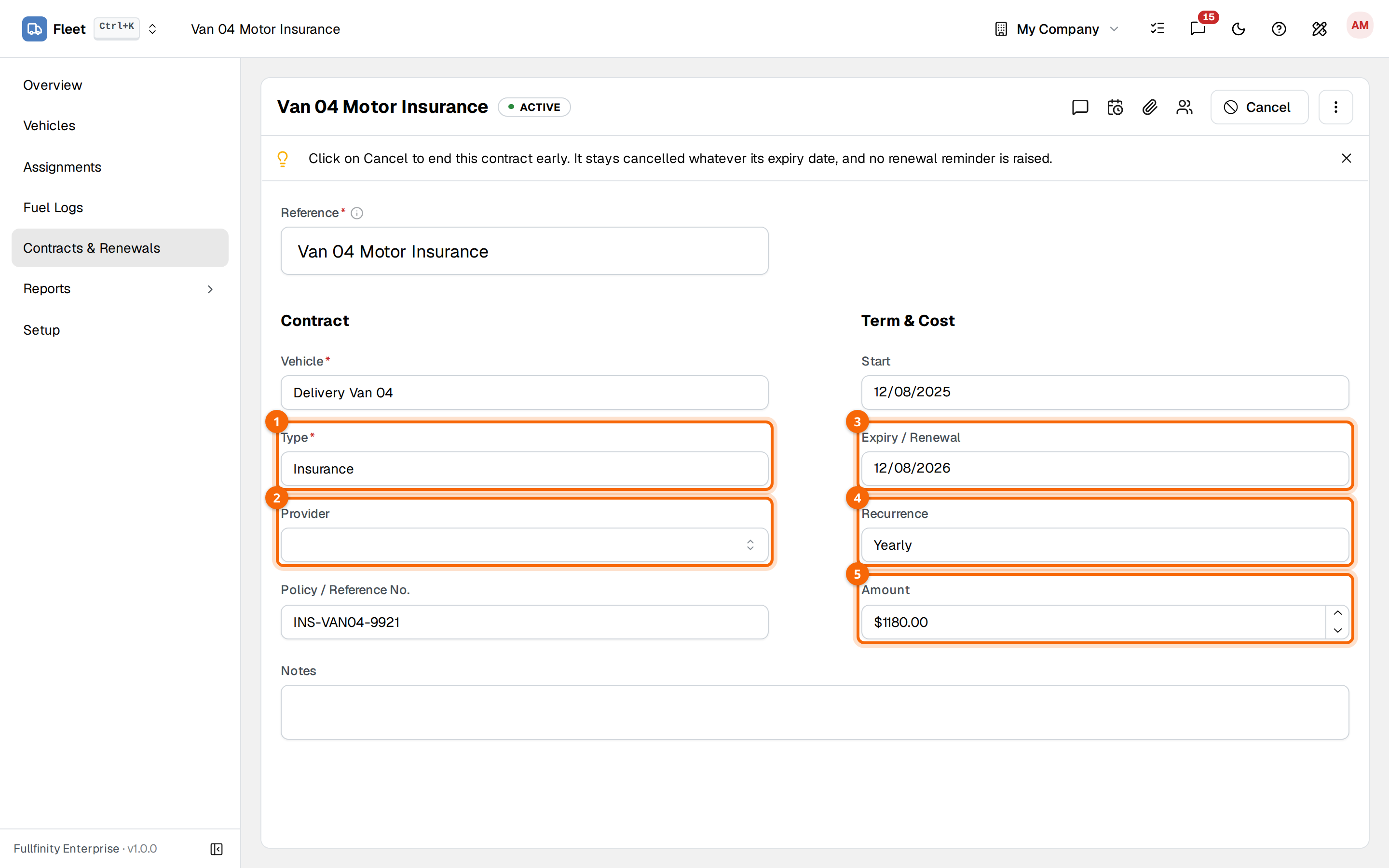
- Go to Fleet → Contracts & Renewals and click New — or add one on the vehicle's Contracts & Renewals tab.
- Give it a reference, choose the Vehicle and the Type, and the Provider.
- Under Term & Cost, the Start and Expiry / Renewal dates, the Amount and how often it is paid (Recurrence).
Reminders
When a contract is within the Renewal Lead Time (days) of its expiry, a to-do is created on the vehicle, due on the expiry date. It goes to the person who looks after the vehicle in Maintenance (its default technician, or whoever uses it), or else to a Fleet manager.
To renew, change the Expiry / Renewal date to the new one: the reminder is set up again for the new date. A contract past its expiry shows as Expired.
Its cost
A contract's cost counts towards the vehicle's cost of ownership as it is incurred: a yearly lease signed last month has cost about a month of it so far, not the whole year. See How do I see what a vehicle costs and get it serviced?