How do I save a search to use again?
Save the filters and grouping you have set on a list as a named view, keep it for yourself or share it, and make it the list's default.
When you find yourself setting up the same filters every morning — my open quotes, customers in Germany — save them once as a view. One click brings the whole search back.
1. Set up the search
Open the list and use the search bar and the Browse panel to filter and group it the way you want. See How do I find my way around Fullfinity?
2. Save it
In the Browse panel, click + beside Saved Views. The Save current view window opens.
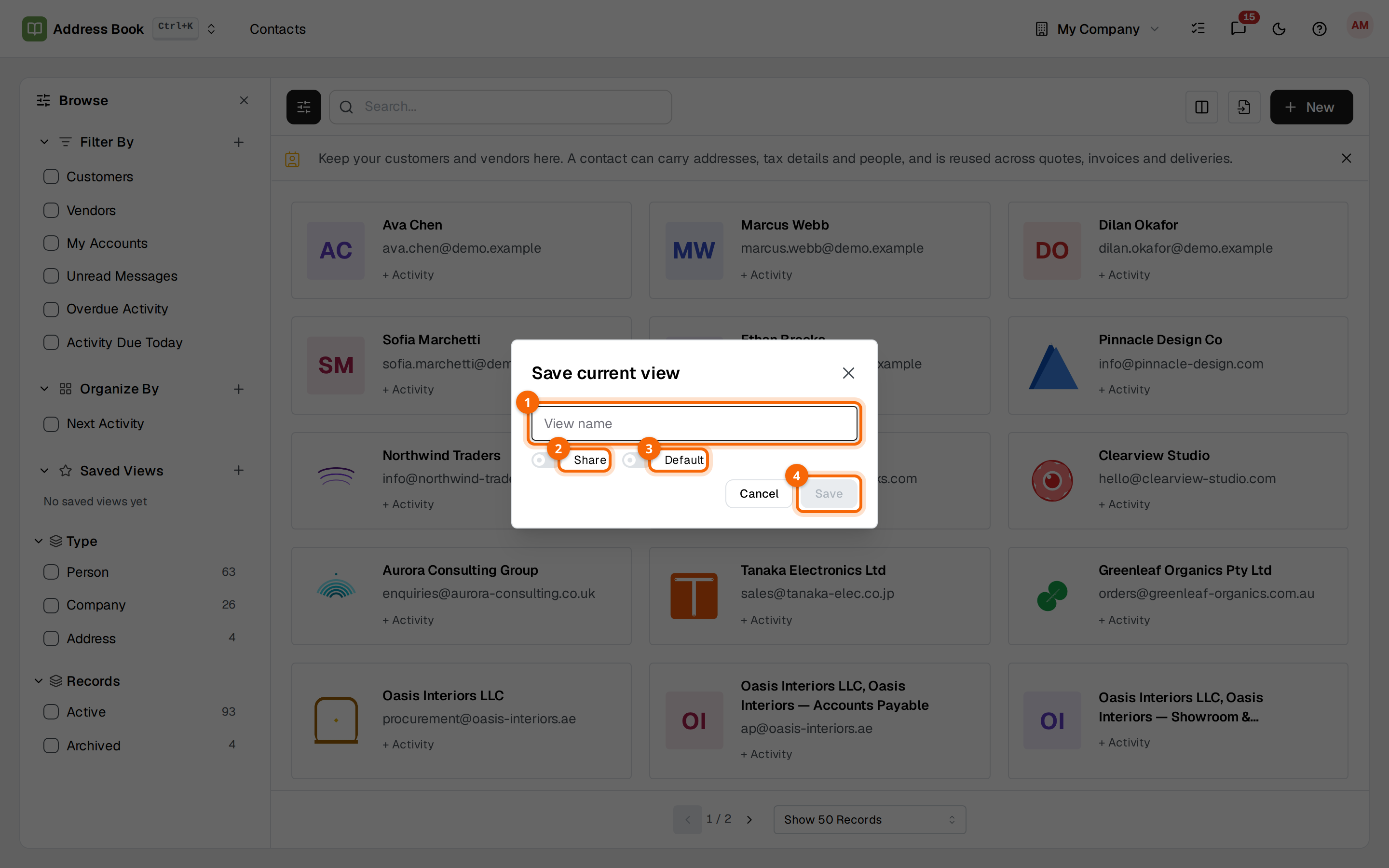
- Type a name — what you would call this list (Wholesale customers).
- Share — switch on to let everyone who can open this list use the view too. Leave it off to keep it to yourself.
- Default — switch on to open this list with this view applied every time.
- Click Save.
3. Use it
Your view now appears under Saved Views. Click it to apply it: the filters and groupings it holds are ticked again above it, so you can always see what it is doing, and adjust from there. The view in use is marked with a tick.
A person icon marks a view of your own, a group icon one that is shared. To delete a view of your own, click the X at the end of its row. A shared view can only be removed by the person who created it.