How do I check quality during manufacturing?
Have checks created when a work order starts, and stop the work order — and the production — until they pass.
Checks can sit in the middle of production instead of at a warehouse door: a fit-and-finish check after assembly, a burn-in test before packing.
1. Switch it on
In Manufacturing → Setup, switch on Manufacturing Quality and click Save. Work orders must be on as well.
2. Point a control point at the operation
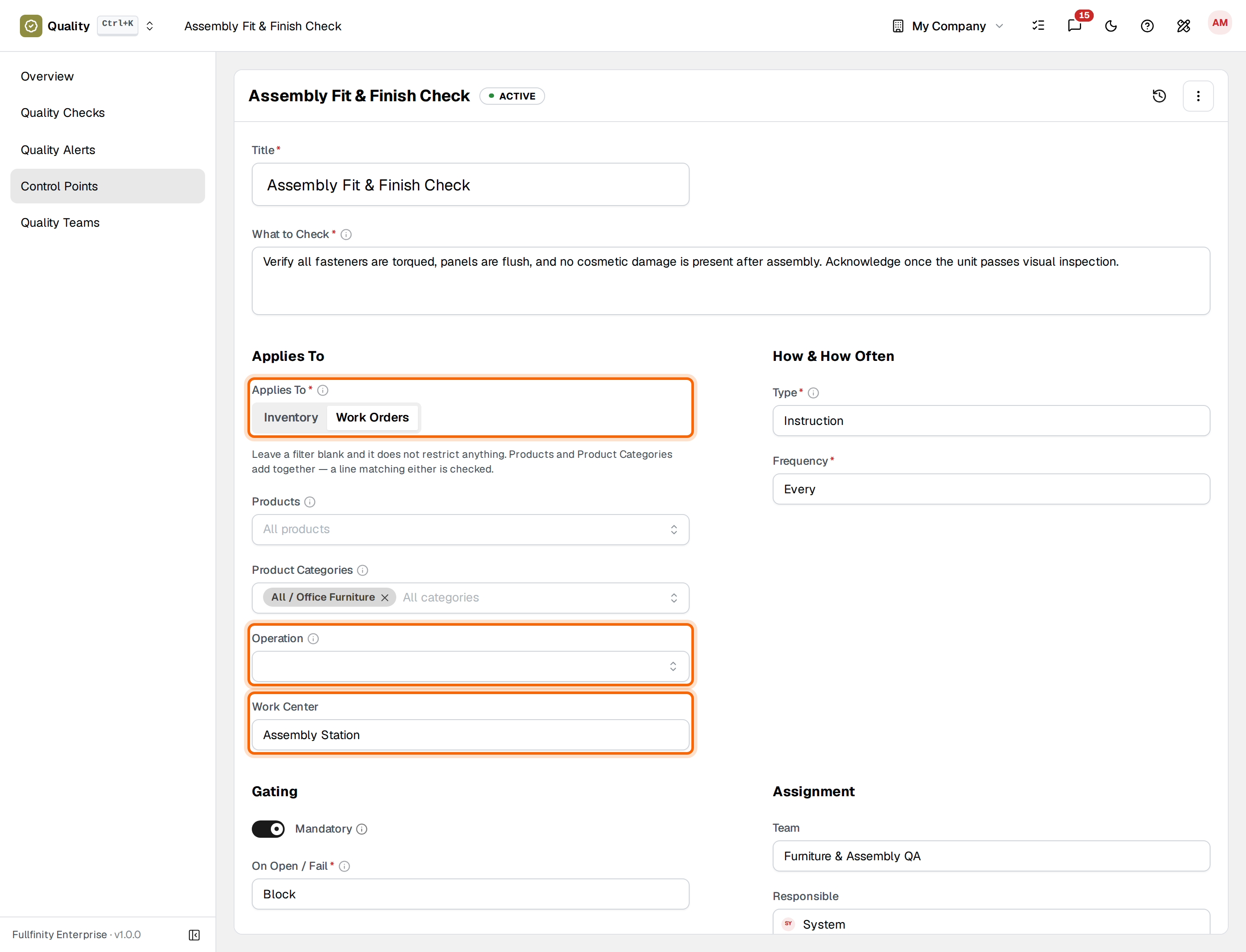
Create a control point (see How do I decide what gets inspected?) and set Applies To to Work Orders. Then choose the Operation it belongs to — or a Work Center, to check every operation done there. One of the two is required.
3. What happens on the floor
- The checks are created when the work order starts.
- Marking the work order done opens the inspection for its mandatory checks first — in Manufacturing, or on the Shop Floor tablet (see How do I do quality checks on the Shop Floor?).
- A failed mandatory check with the Block rule stops the work order from being finished, and stops the whole order from being produced. The error says which check, on which work order, at which work center.
Settle the failure as for any check (see What do I do when a quality check fails?). For a manufactured unit, Scrap takes it from the production area and Unbuild takes it apart once it has been produced.