How do I decide what gets inspected?
Create a control point that says what to check, where, how often, and what happens to goods that fail.
A control point is the rule behind every check: inspect every laptop we receive for a working screen, or measure one desk in five for height travel. Go to Quality → Control Points and click New.
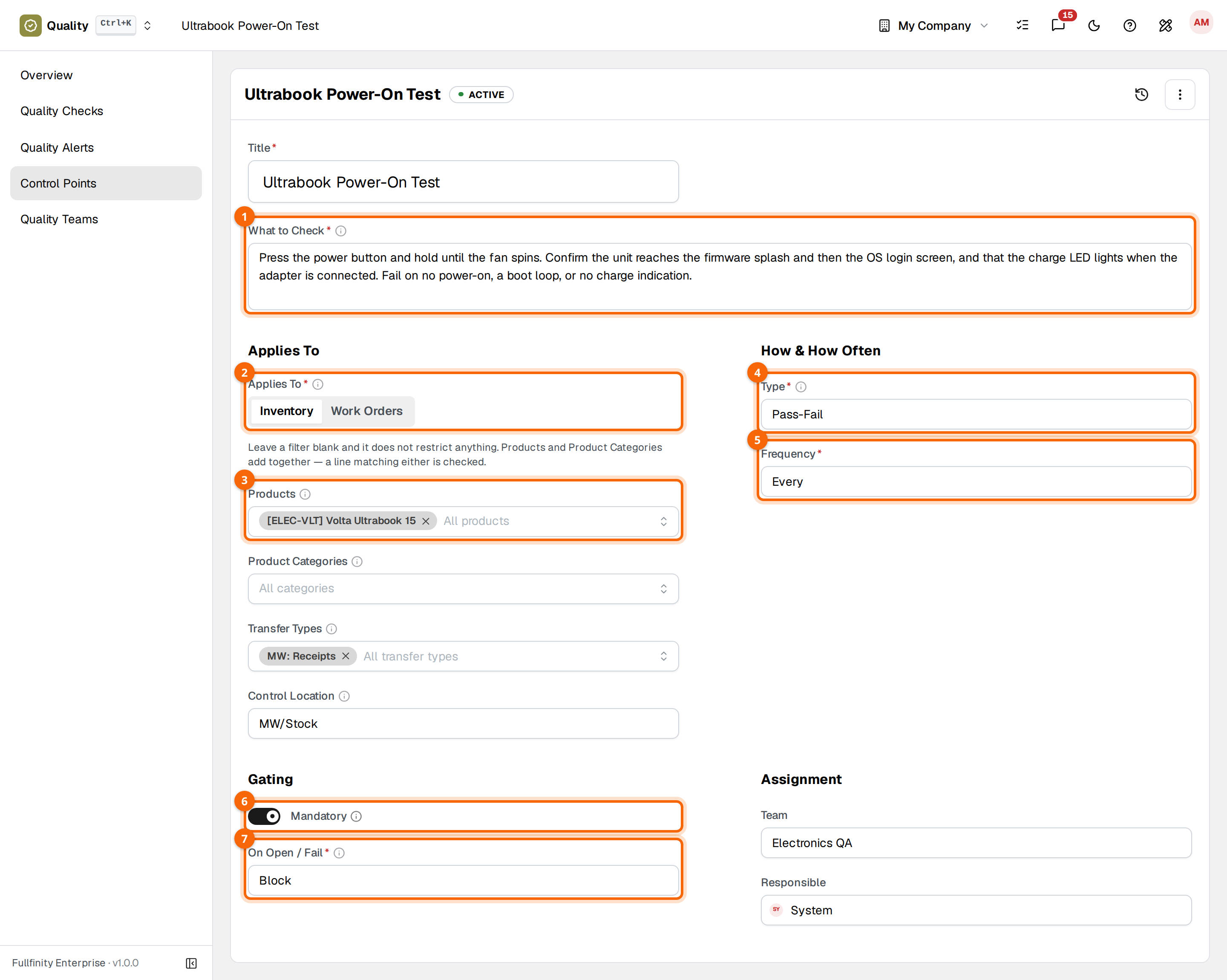
- What to Check — the instruction the inspector reads. Say what to look at and what a pass looks like; a bare title tells them nothing.
- Applies To — Inventory to check goods moving through a location, or Work Orders to check them as they are made.
- Which goods: Products and Product Categories add together — a product in either list is checked. Leave both blank to check everything. Transfer Types narrows it to, say, receipts only.
- Type — Pass-Fail for a yes/no verdict, Measure for a reading checked against a tolerance, Instruction for a step the inspector confirms they did.
- Frequency — Every time, Periodic (every Nth time, set in Frequency Value) or Random (a percentage chance). Sampling counts across all transfers, so every 5th really is one in five.
- Mandatory — only a mandatory check can hold goods. An optional one is still put in front of the inspector, but can't stop anything.
- On Open / Fail — what an open or failed check does to the goods:
- Block — nothing on that transfer leaves the control location until the check is resolved.
- Quarantine — the failed goods stay behind for a decision, and the rest of the transfer goes on without them.
- Warn — the result is recorded and the goods move anyway.
Where it checks
For an inventory check, Control Location is where goods wait to be inspected. Leave it blank to use every warehouse's quality control location — Checks Generated At shows which locations that is. If it says Nowhere yet, no warehouse has one: pick a location, or set up a three-step reception (see How do I set up Quality?).
Measurements
For a Measure check, the Tolerance section asks for a Min, a Max or both, and the Unit of Measure. A reading inside the range passes. At least one bound is required — a measurement with no limits could never fail.
Choose the Team and Responsible person who follow up failures, and click Save.