How do I keep drawings and specifications with a bill of materials?
Upload engineering documents, release them as the current revision, and keep every older version.
An engineering document is a drawing, specification, CAD file, work instruction or certificate that belongs to a revision of a bill of materials. Each new version replaces the last one but never deletes it.
Add a document
- Go to Engineering → Engineering Documents and click New — or add it on the Documents tab of a change order.
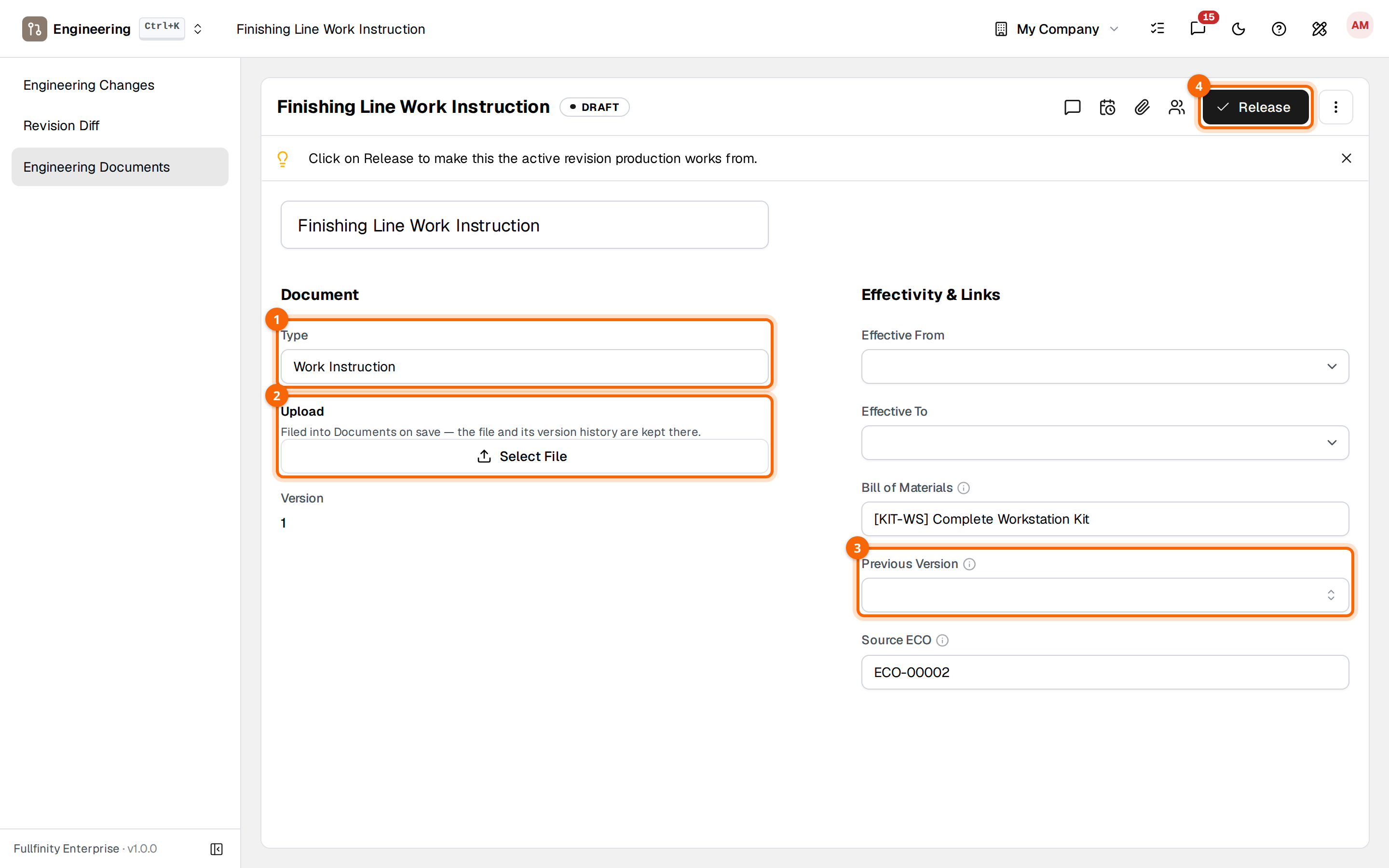
- Give it a title, choose its Type and upload the File.
- Choose the Bill of Materials it belongs to. For a new version of an existing document, set Previous Version to the one it replaces.
Release it
A new document is a Draft. Click Release to make it the Active revision: it takes effect from its Effective From date (today if blank), and the version it replaces becomes Superseded from that day.
A document added to a change order is released by the change itself, on the day it is applied, and attached to the new revision of the bill of materials — so the drawing and the bill that matches it always go live together. Each bill of materials lists its documents on its Documents tab.
Reset to Draft takes an active document back to draft. A superseded one stays as it is: it is the record of what was used.