Why does the quantity on hand look wrong?
The usual reasons a product's On Hand or Available figure differs from what you expect, and how to check and correct it.
Before correcting anything, check which number you're looking at and what it includes — most "wrong" quantities are right, just counted differently from what you expected.
Which number?
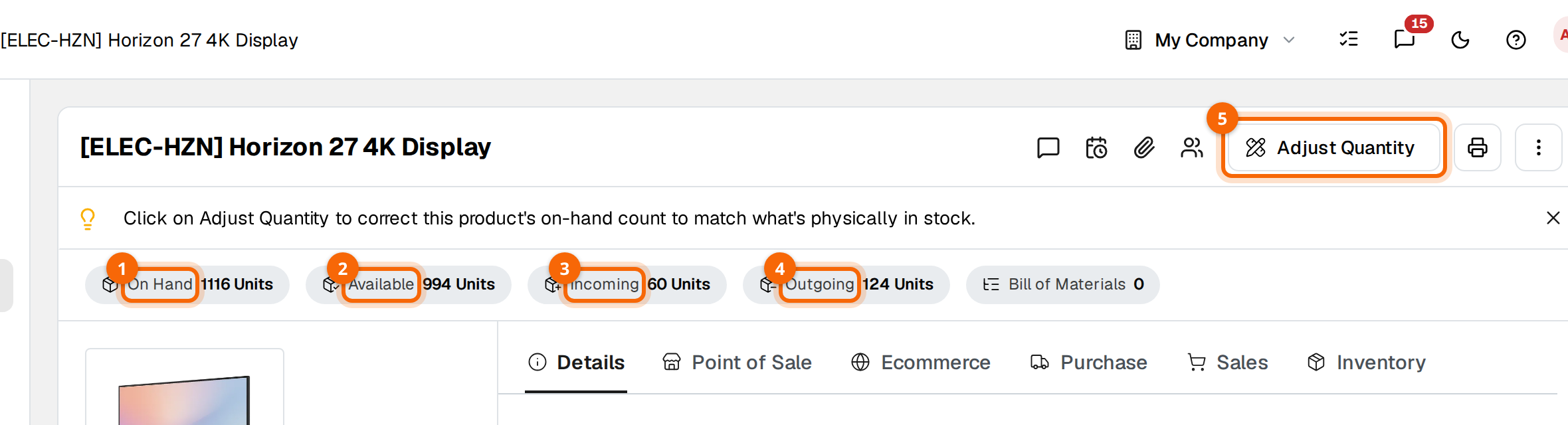
A product shows four figures:
- On Hand — everything physically in stock, across all your warehouses and locations.
- Available — on hand minus what is reserved for transfers. Lower than On Hand whenever orders are waiting to ship.
- Incoming and Outgoing — what receipts and deliveries not yet done will add or remove.
Common reasons
| What you see | Why |
|---|---|
| Goods arrived but On Hand didn't go up. | The receipt isn't Done yet — they still count as Incoming. Open it and click Mark Done. |
| Goods shipped but On Hand didn't go down. | The delivery isn't Done yet. |
| On Hand is higher than one shelf holds. | It adds up every warehouse and location. Click On Hand to see the split, or open Inventory → Reports → Stock Levels. |
| Available is much lower than On Hand. | Stock is reserved for deliveries. See Inventory → Reports → Stock Reservations. |
| A kit's quantity changes though you never stocked it. | A kit's figure is how many complete kits its components can make. |
| A product with variants shows a large total. | The product's figure adds up all its variants; open a variant to see its own. |
| The figures don't appear at all. | The product doesn't have Track Inventory on, or has Allow Negative Stock on. |
Find out what changed it
Open Inventory → Reports → Stock Ledger and group or search by the product. Every movement is listed with its Transaction Type and the location's Running Balance, so you can see exactly where the number came from.
Correct it
If the shelf really disagrees with the system, click Adjust Quantity on the product and enter the real figure with a reason — see How do I correct a stock quantity? For many products, run an inventory count.
Was this article helpful?