How do I adjust and lock a consolidation?
Add group-level adjustments that aren't in any company's books, then lock the consolidation when it is final.
Some corrections belong only to the group's figures — an audit adjustment, a reclassification — and not to any one company's books. Record them on the consolidation itself.
Add an adjustment
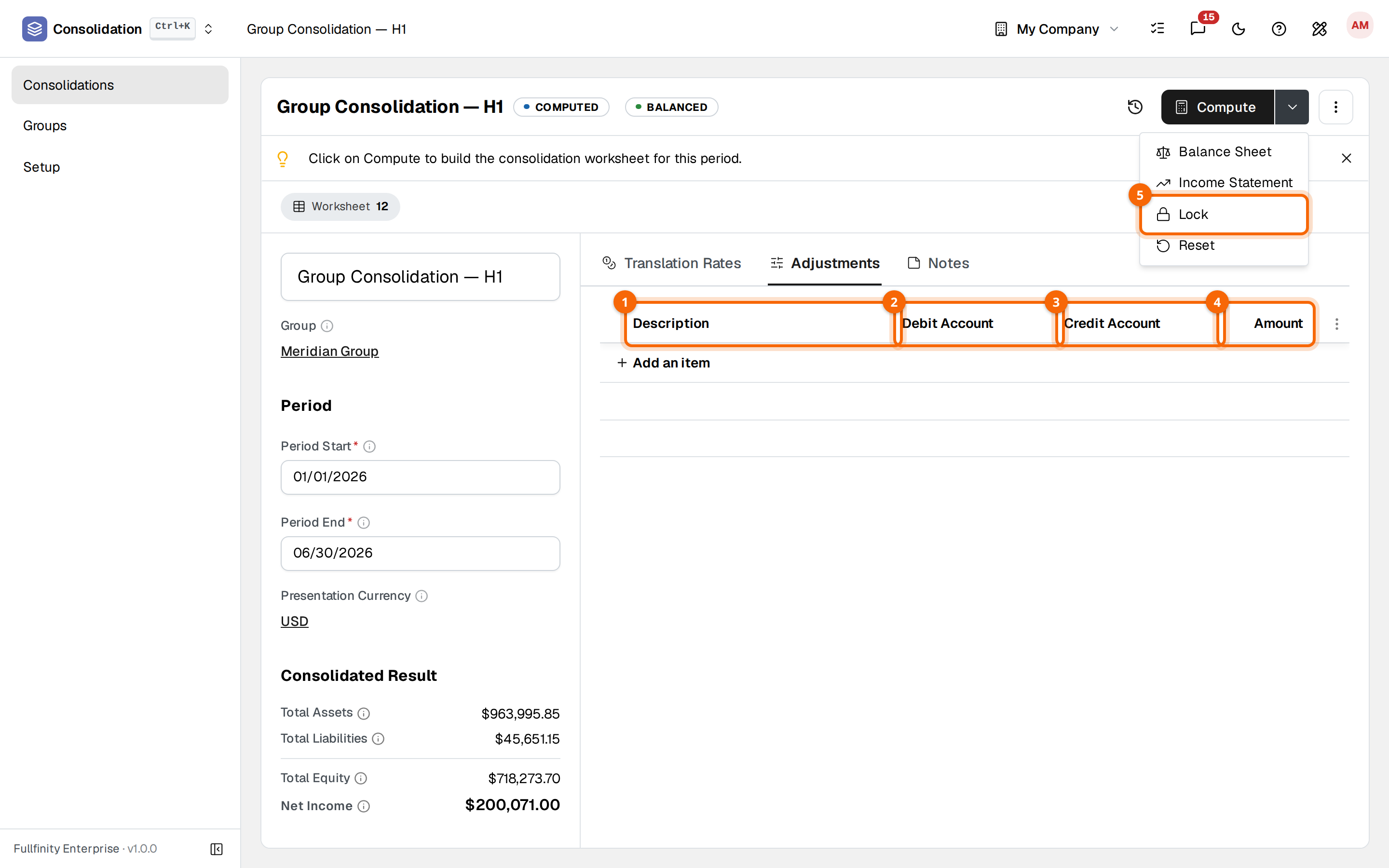
- Open the consolidation and go to the Adjustments tab.
- Add a line: a Description, the Debit Account and Credit Account, and the Amount in the group's currency.
- Click Compute. The adjustment is included in the totals and the statements.
Lock it
When the figures are final, click the arrow next to Compute and choose Lock. A Locked consolidation can't be computed again, so its figures stay as reported even if the books change later.
To change it after all, click Reset: a locked consolidation goes back to Draft with its figures kept, ready to compute again. Reset on a consolidation that isn't locked clears its result entirely.
For a new period, create a new consolidation instead — each one is a record of its own period.