How do I add a customer to a sale?
Pick an existing customer or create one at the register, so the sale shows on their account, earns loyalty points and can be billed to them.
A sale with no customer is a walk-in sale. Name the customer when you need the sale on their record: to give them their own prices, to earn or spend loyalty points, to email the receipt, or to bill them on account.
Click the customer button beside Pay — it reads Walk-in until you choose someone.
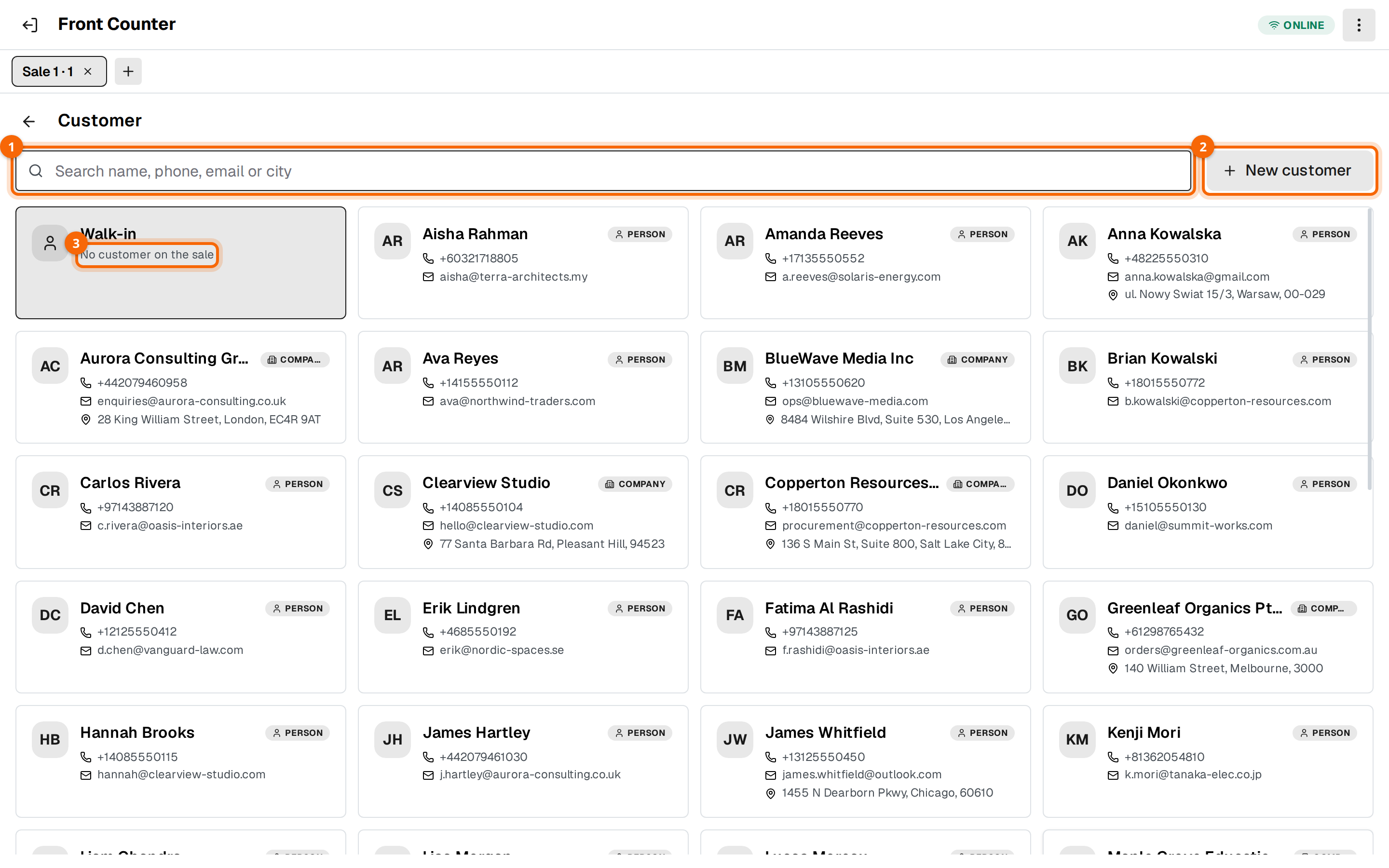
- Search by name, phone, email or city, then tap the customer.
- New customer — for someone not yet on file. Choose Person or Company, fill in their Name and whatever else you have, and click Save & select. Adding a customer needs a connection.
- The first card takes the customer off again, making it a walk-in sale.
You're back on the sale with the customer's name on the button. If they have their own pricelist, the sale is priced with it when you pay.
When the sale is finished the next one starts as a walk-in again — a customer never carries over to the next sale.
Was this article helpful?