How do I create a subscription plan?
Set how often a plan bills, whether at the start or the end of each period, a free trial, a fixed term and what happens at its end, and the products the plan charges for.
A plan is something you offer on a subscription — Pro, billed monthly or Enterprise, billed yearly with a two-week trial. It holds the billing schedule and the products it charges for. Every subscription starts from a plan, so create your plans first.
Go to Subscriptions → Plans and click New.
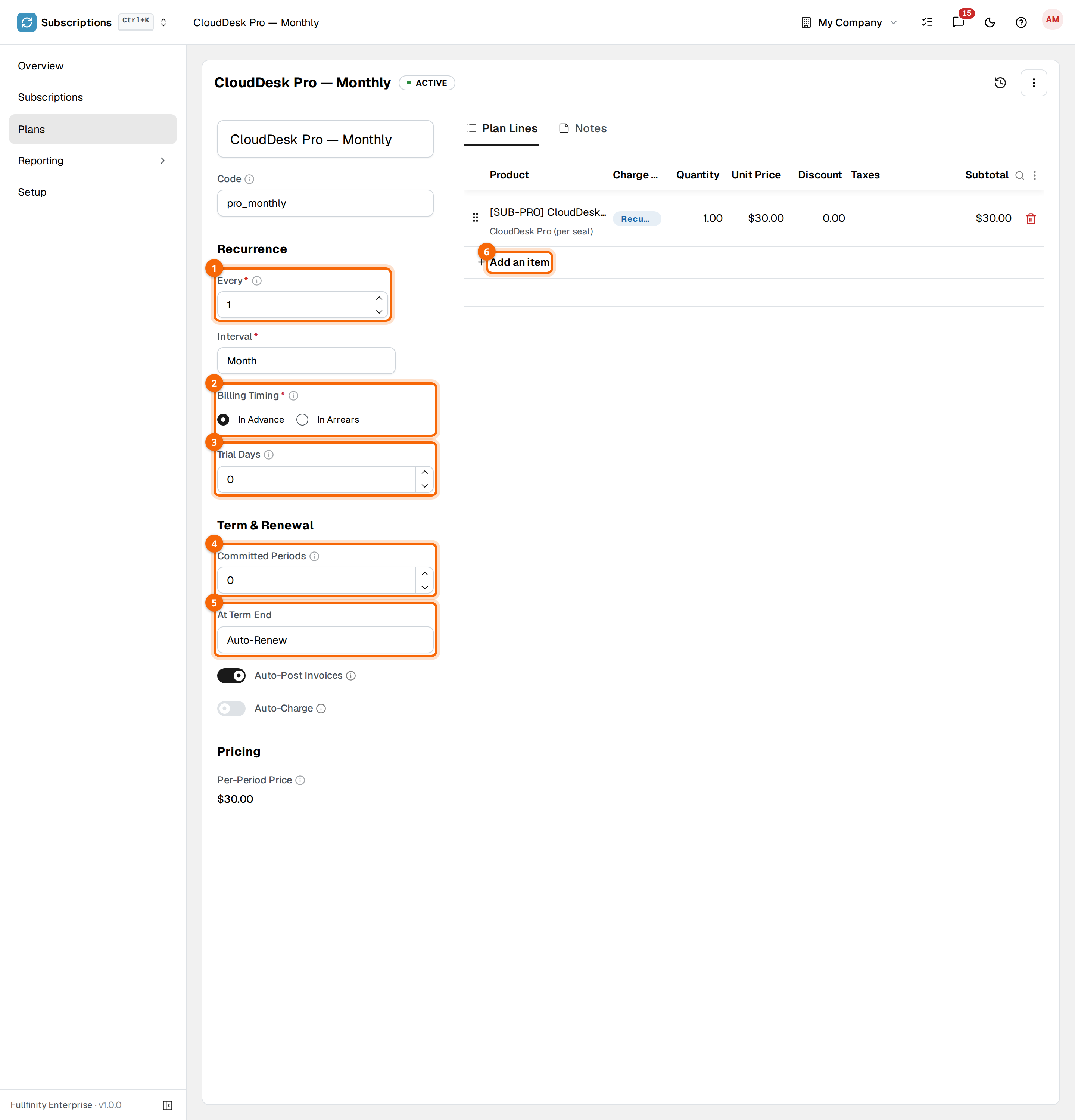
Type the plan's name in the large field at the top, for example Pro — Monthly. Customers see it on their invoices and in their online account. The Code below it is for your own reference.
Recurrence
- Every and Interval — how often the plan bills: every 1 Month, every 3 Months, every 1 Year. The Interval can be Day, Week, Month or Year.
- Billing Timing:
- In Advance — each period is billed when it starts. The first invoice is raised as soon as the subscription starts.
- In Arrears — each period is billed when it ends, for the time the customer has just had.
- Trial Days — a free trial before the first invoice. Leave it at 0 for no trial.
Term & Renewal
- Committed Periods — for a fixed-term contract, how many billing periods it runs, for example 12 monthly periods for a one-year contract. Leave it at 0 for a subscription that simply continues until it is cancelled. A subscription on a fixed-term plan gets an End Date when it starts.
- At Term End — what happens when a fixed term runs out:
- Auto-Renew — the term is extended by the same number of periods and billing continues.
- Manual Renewal — billing stops at the end of the term; the subscription stays open so you can agree a renewal with the customer.
- Expire at Term End — the subscription closes at the end of the term.
Two more switches set how a new subscription on this plan bills. Each subscription can still change them for itself:
- Auto-Post Invoices — post each invoice as soon as it is raised. Turn it off to have invoices wait in Draft for you to check.
- Auto-Charge — charge the customer's saved payment method when an invoice is raised.
What the plan charges for
- On the Plan Lines tab, click Add an item for each product the plan bills. Set the Quantity, Unit Price, any Discount and the Taxes, and choose the Charge Type:
- Recurring — billed every period.
- One-Time — billed once, on the first invoice, such as a setup fee.
Per-Period Price in the side panel shows what the plan bills each period before tax. Click Save.
➡️ Next: How do I start a subscription?