How do I post a manual journal entry?
Record an adjustment directly in your accounts — opening balances, accruals, reclassifications — with balanced debits and credits.
Most entries in your books come from invoices, bills and payments. For everything else — opening balances, accruals, moving an amount from one account to another — post a journal entry yourself.
1. Create the entry
- Go to Accounting → Journal Entries and click New.
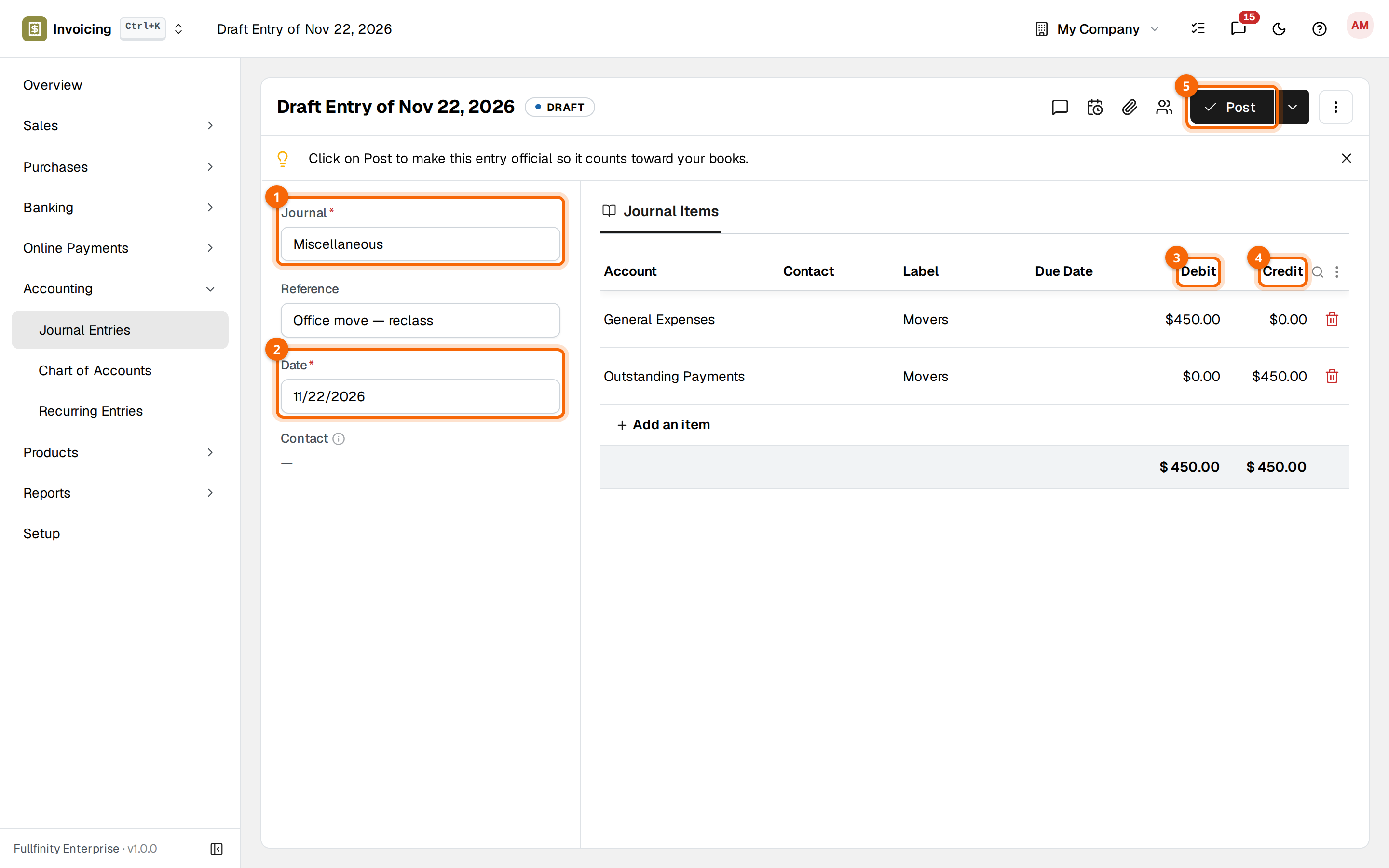
- Journal — starts as Miscellaneous, the usual journal for adjustments.
- Date — the date it counts in your accounts.
Add a Reference so you can find it again (e.g. OPEN-2026).
2. Add the journal items
On Journal Items, add one line per account:
- Account — required.
- Contact — the customer or vendor, when the line is for one.
- Label — what the line is for.
- Debit or Credit — the amount, on one side.
The totals under the lines show both sides. You need at least two lines, and total debits must equal total credits.
3. Post it
Click Post. The entry gets its number from the journal and counts in every report from its date. Posting is refused if it is out of balance (the message shows both totals and the difference) or has fewer than two lines.
Posting the same entry every month? Make it a recurring entry.