How do I register a piece of equipment?
Record a machine or asset with who looks after it, its warranty and its usage meter, and see its full maintenance history.
Go to Maintenance → Equipment and click New.
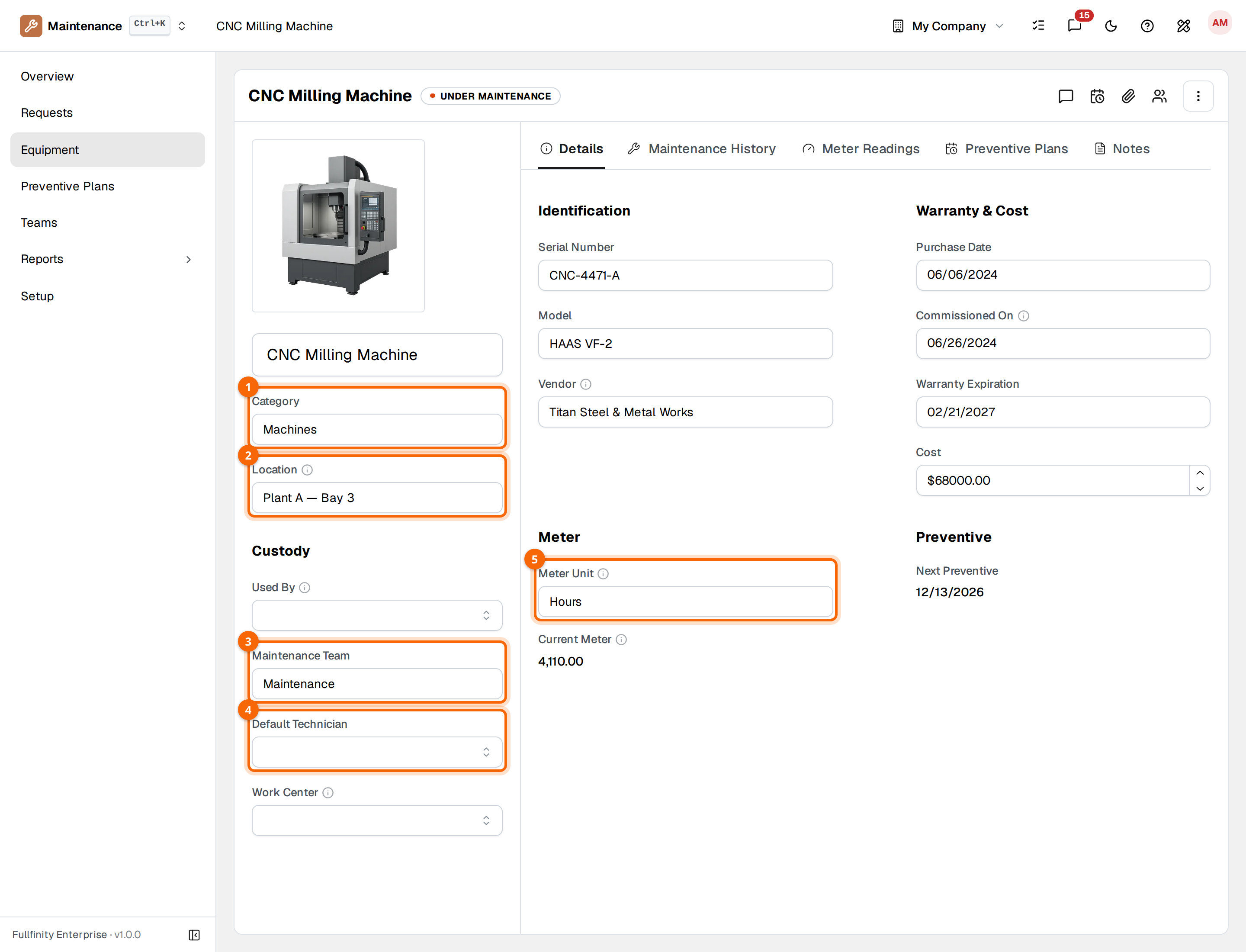
- Name it, add a photo, and choose its Category.
- Location — where it physically is: a site, a room, a production line.
- Maintenance Team — the team that repairs it. It starts as the default team from the settings.
- Default Technician — who usually works on it. Used By is the person who uses it day to day.
- Under Meter, the Meter Unit it is measured in (Hours, km, Cycles). Current Meter follows the latest reading.
A request raised on this equipment is given its team and technician automatically. On the Details tab, keep its Serial Number, Model, Vendor, purchase and Warranty Expiration dates and Cost.
Meter readings
Add readings on the Meter Readings tab — a date and a Meter Value. Usage-based preventive plans read them (see How do I schedule preventive maintenance?). For vehicles, fuel entries can record the odometer for you.
Its status and history
The status at the top follows the work on it: Operational, Under Maintenance while a breakdown is open, and Scrapped once retired. Maintenance History lists every request, and Preventive Plans the plans that service it and when each is next due.