How do I ship or receive part of an order (backorders)?
Complete a transfer for what you have, and carry the rest to a backorder that follows later.
When only part of an order can go out (or only part of a shipment arrived), complete the transfer for what you have. The rest can move to a backorder — a new transfer for the remaining quantity.
Send part of a transfer
- Open the delivery or receipt and enter the quantities you're actually handling in Qty Done.
- Click Mark Done.
- You're asked "Create Backorder?", with a list of what remains. Click Create Backorder to keep the rest open, or No Backorder if it won't be coming.
The transfer moves to Done. A backorder carries the remaining quantity with the same customer or supplier.
Find backorders
- On the original transfer, click Backorders to open the follow-up. On the backorder, Back Order Of leads back.
- In any transfer list, the Backorders filter shows all of them.
Stop being asked every time
Each transfer type has a Backorder Policy (1). Open it from Transfer Types under Setup:
- Ask — the question above (the default).
- Always — always create the backorder, without asking.
- Never — drop the remainder. Only sensible where the shortfall is tracked elsewhere.
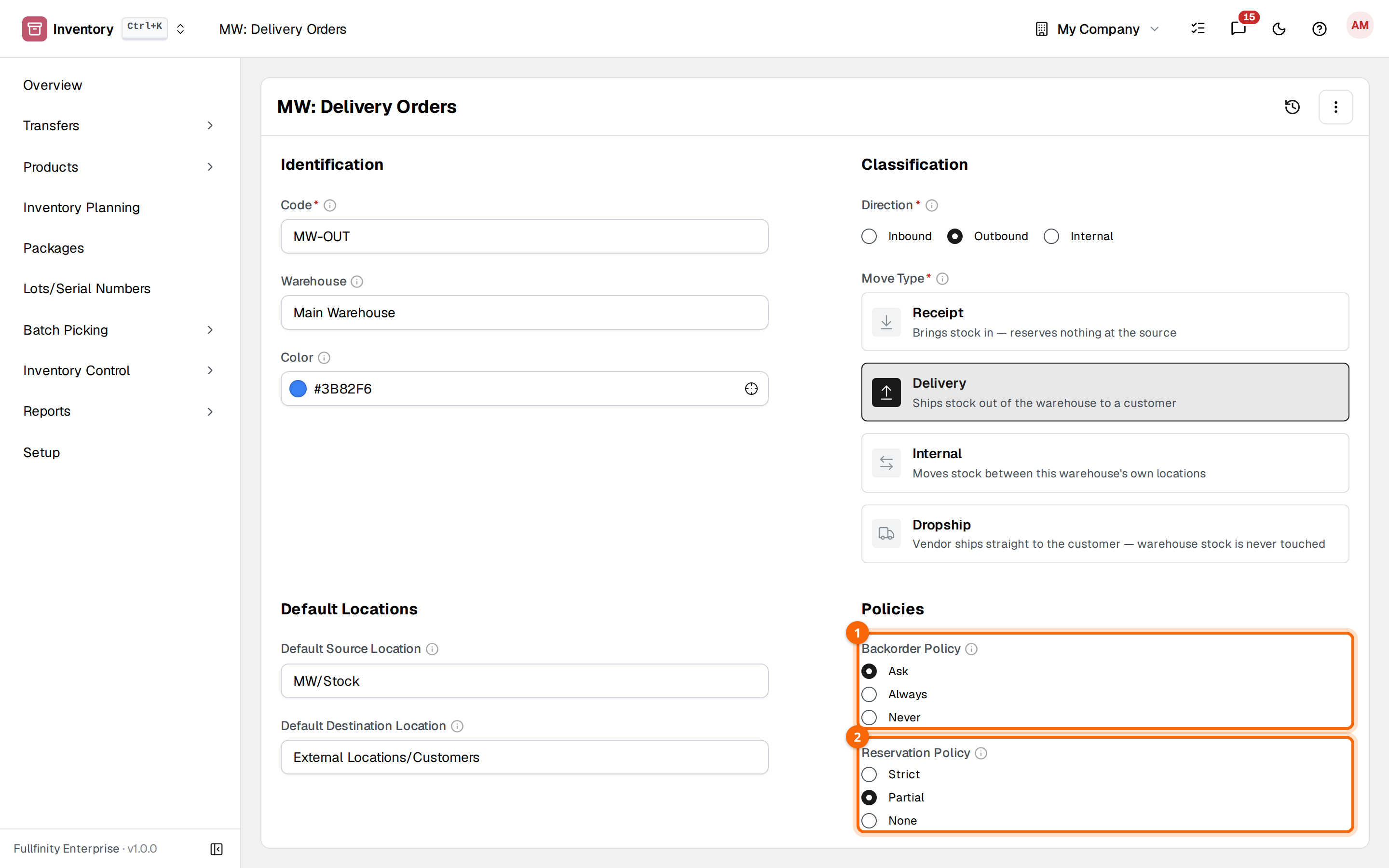
The Reservation Policy (2) beside it decides whether partial shipping is allowed at all — see How do I reserve and release stock?
Was this article helpful?