How do votes and accepted answers work?
Members like posts in a discussion, vote answers up or down in a Q&A, and the person who asked marks the answer that solved it.
Votes show which posts the community finds useful. What a vote can be depends on the forum's Format.
| Format | Members can | The best posts |
|---|---|---|
| Discussions | Like a post | Topics with the most likes come first under Top |
| Questions & Answers | Vote a question or an answer up, or down | Answers are ordered by votes, the accepted one first |
Vote
The arrows (or the heart, in a discussion) are beside each post, with its score between them. Click once to vote; click the same arrow again to take the vote back; click the other arrow to change it. Members can't vote on their own posts, and a visitor who isn't signed in is asked to sign in.
Accept the answer that solved it
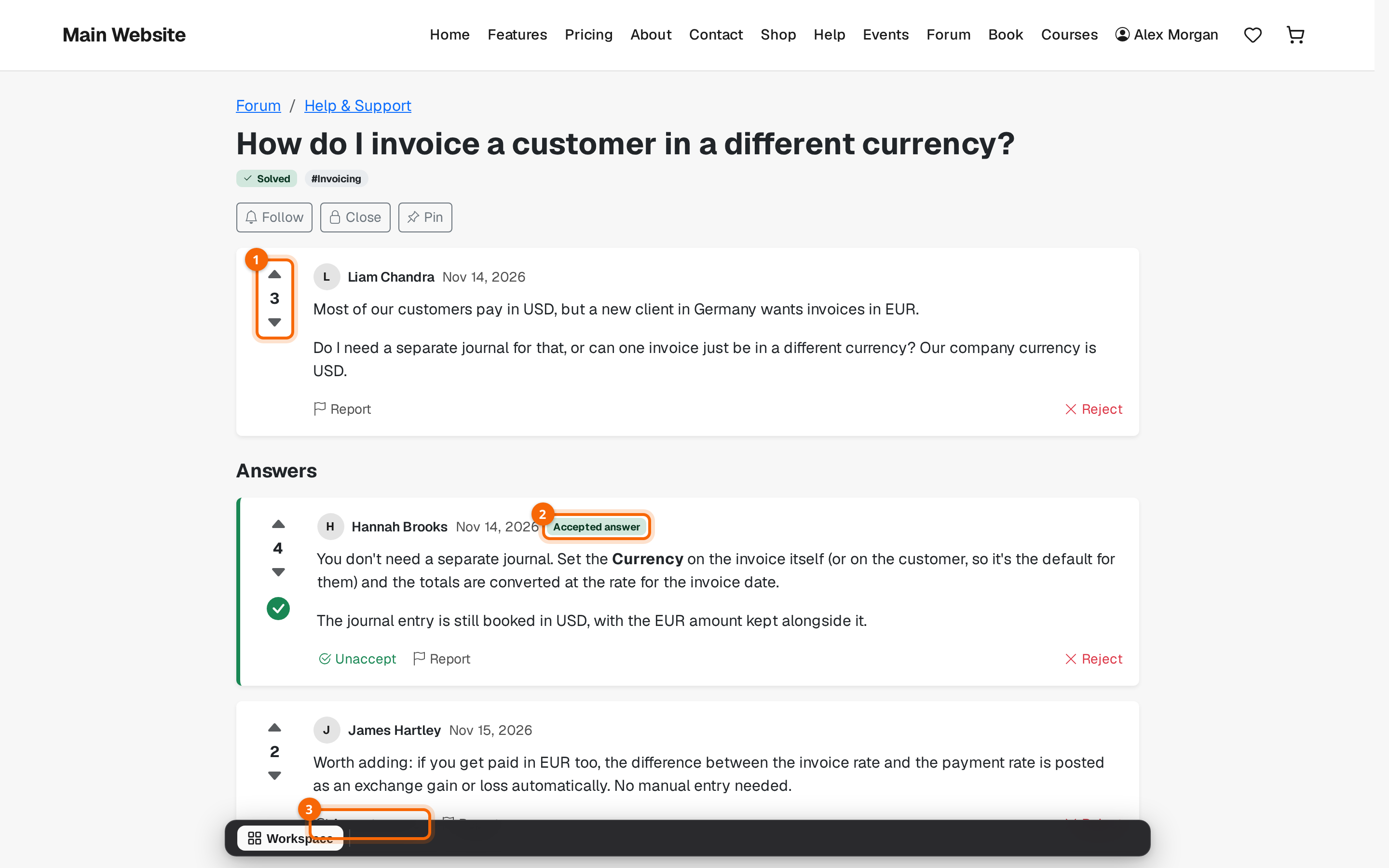
- The score of the question — how many people found it useful.
- The accepted answer, marked Accepted answer with a green check. It is shown straight after the question, and the topic is marked Solved on the forum page.
- Accept answer — the person who asked (or a moderator) clicks it under the answer that solved the question. A question has one accepted answer: accepting another moves the mark, and Unaccept removes it.
If a moderator rejects the accepted answer, it stops being accepted and the question is unsolved again.
In the backend, the votes on a post are on the Votes tab of the post (Forum → Topics, open the topic, then the post).
Was this article helpful?