How do I add a link or a placeholder for a file I'm waiting for?
File a web link as a document, or ask someone for a file and let them upload it from a link.
Not every document is a file you have. A design kept in an online tool can be filed as a link, and a document you are still waiting for can be filed as a placeholder, so it shows up in the right folder until it arrives.
File a link
- In Documents → Documents, click New.
- Name it, and set Type to Link.
- Paste the address in Link URL, choose the Folder and save.
In the browser, a link document opens with Open Link.
Wait for a file
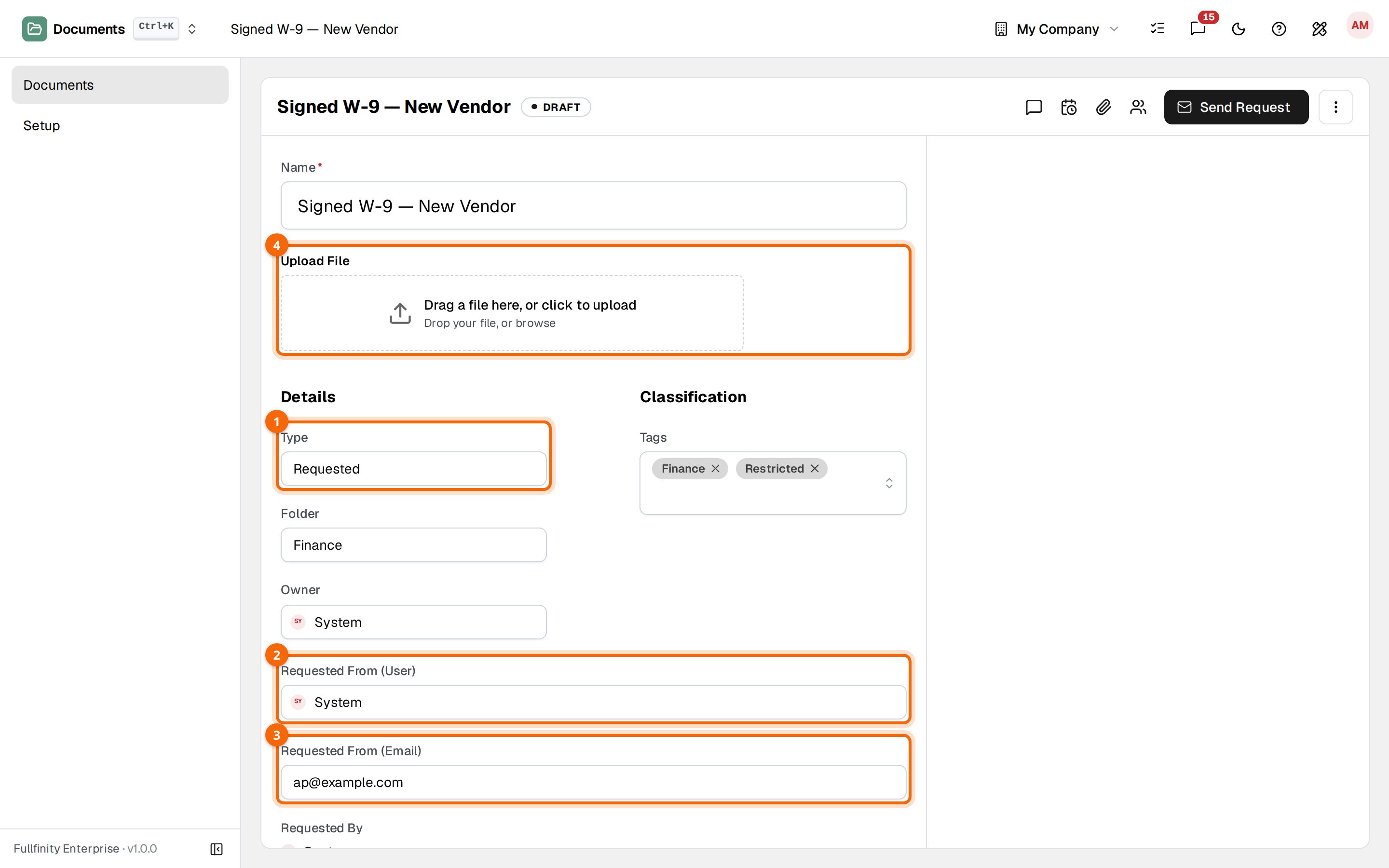
- Click New, name the document (Signed W-9 — New Vendor) and set Type to Requested.
- Fill in who it is coming from: Requested From (User) for a colleague, or Requested From (Email) for someone outside the company.
- Save. Requested By records that it was you.
- Click Send Request. The person gets an email with an Upload the file button; Request Sent shows when it went. Clicking Send Request again re-sends the same link.
The link opens a page where they choose the file and click Upload — no account needed. It accepts one file, up to your Max Upload Size (MB).
When the file arrives
The document becomes a normal file document with its first version, a note on it records the file that arrived, and whoever requested it gets an email. The link stops working, so nobody can send a second file through it. If the person emails the file to you instead, drop it onto the document yourself: that closes the request the same way.