How do I invoice a repair?
Turn a finished repair's billable parts and labor into a customer invoice.
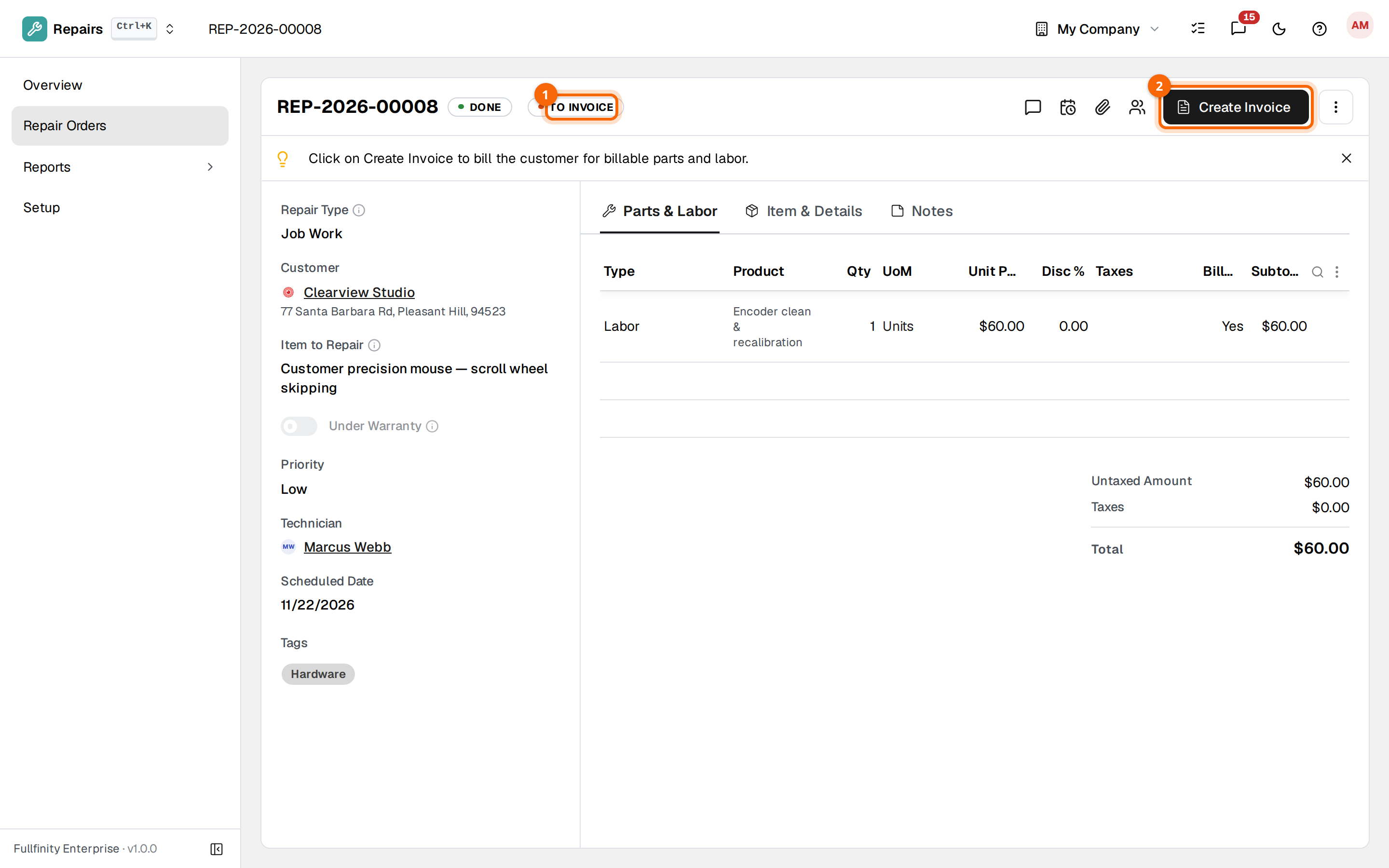
Once a repair is Repaired or Done, its billable lines can be invoiced. The invoice status beside the repair's status tells you where it stands.
- Open the repair. Its invoice status reads To Invoice (1).
- Click Create Invoice (2). A draft customer invoice opens with one line for each billable part and labor line — quantity, price, discount and taxes as on the repair — and the repair's reference.
- Check the invoice, then post and send it as any other invoice.
| Invoice status | Means |
|---|---|
| Nothing to Invoice | The repair isn't finished yet. |
| To Invoice | Finished, with billable lines not yet on a posted invoice. |
| Fully Invoiced | Every billable line is on a posted invoice. |
| No Charge | Nothing is billable — usually a warranty repair. |
The status follows posted invoices, so it reads To Invoice while the invoice is still a draft. Clicking Create Invoice again then tells you everything is already on a draft invoice rather than billing it twice. The Invoices button opens the repair's invoices.
To list everything waiting to be billed, use the To Invoice filter in Repairs → Repair Orders.
Was this article helpful?