How do I find and filter my invoices?
Search, filter and group the Invoices list, and read the figures along its top.
The Sales → Invoices list shows everything you've billed. Filters and groups narrow it to the invoices you care about.
Search and filter
- Click the filter button beside the search box to open the Browse panel.
- Filter By — tick Overdue, Unpaid, Paid, Draft, Posted or This Month. Ticking several narrows the list further.
- Organize By — group the list by Status, Payment Status, Contact, Journal or Date. Each group shows its own total and amount due.
- Type in the search box to find an invoice by number or customer.
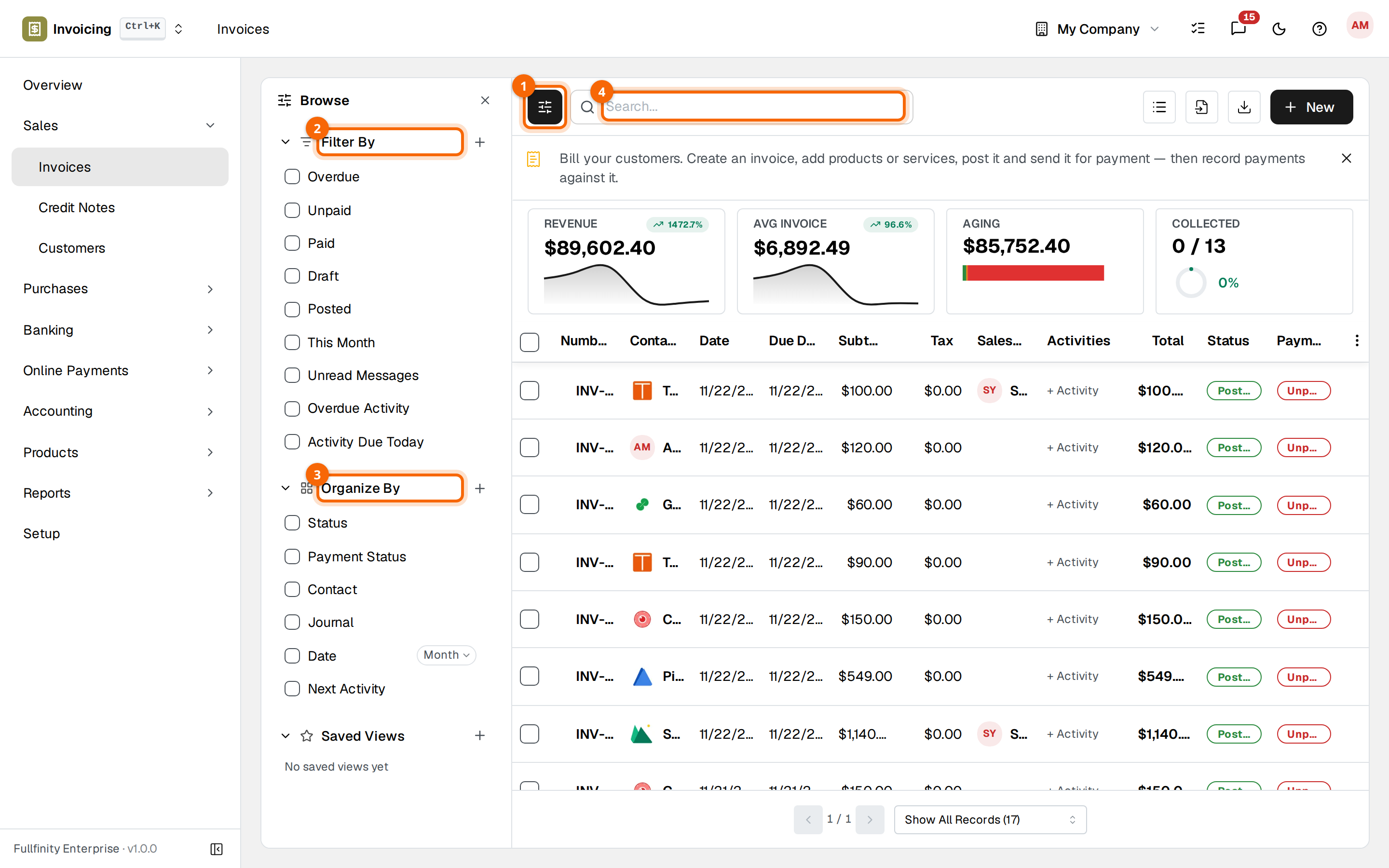
Under Saved Views, click + to keep the current filters and groups for next time.
The figures along the top
Four tiles summarise your Posted invoices:
| Tile | What it shows |
|---|---|
| Revenue | Total invoiced, with the change from the previous period. |
| Avg Invoice | The average invoice value. |
| Aging | What customers still owe you. |
| Collected | How many invoices are fully paid, out of all posted ones. |
Reading a row
Each row shows the invoice Number, Contact, Date, Due Date, Subtotal, Tax, Total and the two badges, Status and Payment. A draft has no number yet. See What do the invoice statuses mean?
Was this article helpful?