How do I set up payment terms and due dates?
Choose how an invoice's due date is worked out — days after the invoice, after the end of its month, or on a set day of the next month.
Payment terms decide when an invoice is due. Pick a term on an invoice (or set a default for a customer or for your whole company) and Fullfinity works out the due date from the invoice Date for you.
Where to find them
Click Setup in the left menu, then the Payment Terms link under Setup. Open a term to change it, or click New.
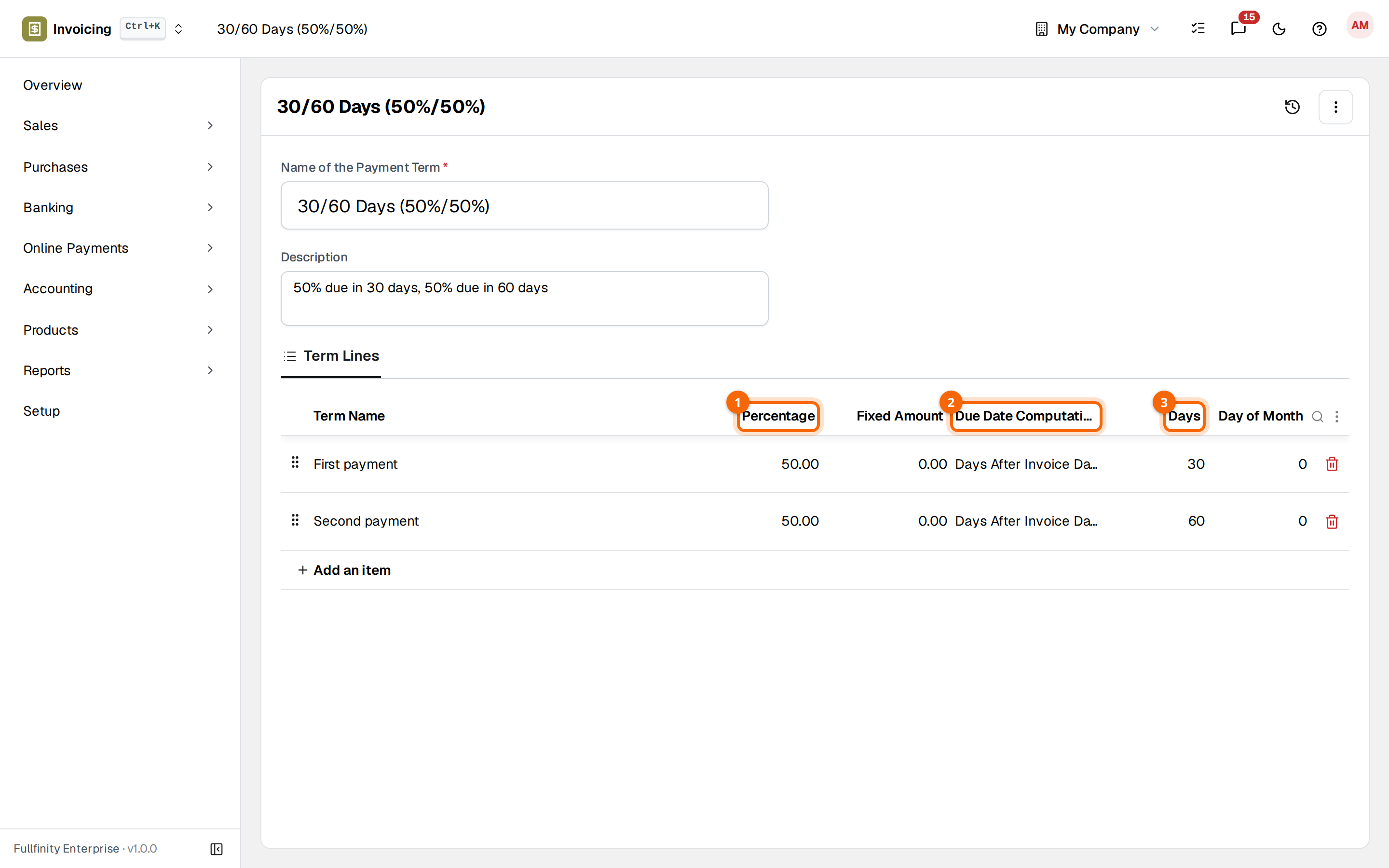
Each payment term has a name, an optional Description, and one or more Term Lines. A term line is one instalment: how much is due, and when.
| Column | What it means |
|---|---|
| Term Name | An optional label for the instalment (e.g. First payment). |
| Percentage | The share of the invoice total this instalment collects. |
| Fixed Amount | A set amount this instalment collects, instead of a percentage. |
| Due Date Computation | How the instalment's due date is worked out (see below). |
| Days | The number of days the computation adds. It can't be negative. |
| Day of Month | Only for Day of Following Month — the day of the month it falls due on. |
The three ways to work out a due date
Days After Invoice Date
The invoice date plus the Days. This is the classic "Net 30".
| Invoice date | Days | Due date |
|---|---|---|
| 15 January 2026 | 30 | 14 February 2026 |
| 15 January 2026 | 0 | 15 January 2026 (due immediately) |
Days After End of Month
The last day of the invoice's month, plus the Days — often written "30 days end of month". Every invoice raised in the same month is due on the same day, however early or late in the month it was dated.
| Invoice date | Days | Due date |
|---|---|---|
| 3 January 2026 | 30 | 2 March 2026 |
| 15 January 2026 | 30 | 2 March 2026 |
| 31 January 2026 | 30 | 2 March 2026 |
| 20 February 2026 | 30 | 30 March 2026 |
| 15 January 2026 | 0 | 31 January 2026 |
(In the January rows, the month ends on 31 January; 30 days after that is 2 March.)
Day of Following Month
A fixed Day of Month in the month after the invoice date — "the 10th of next month". Day of Month is required for this option (any day from 1 to 31), and it can only be edited when this option is chosen.
| Invoice date | Days | Day of Month | Due date |
|---|---|---|---|
| 15 January 2026 | 0 | 10 | 10 February 2026 |
| 31 January 2026 | 0 | 10 | 10 February 2026 |
| 20 December 2026 | 0 | 10 | 10 January 2027 |
| 5 March 2026 | 0 | 31 | 30 April 2026 |
If the month doesn't have that day — the 31st of April — the instalment falls due on the month's last day instead.
Days works here too: it's added to the invoice date first, and the instalment is due on the chosen day of the month after the one that lands in.
| Invoice date | Days | Day of Month | Lands in | Due date |
|---|---|---|---|---|
| 5 January 2026 | 20 | 10 | 25 January | 10 February 2026 |
| 15 January 2026 | 20 | 10 | 4 February | 10 March 2026 |
Splitting an invoice into instalments
Add more than one term line to spread the payment out. Lines are worked through in order: each takes its Fixed Amount if it has one, otherwise its Percentage of the total. The last line always takes whatever is left, so the instalments add up to the invoice total exactly. Each line has its own due-date computation.
The invoice's due date is the date of its last instalment — when it is due in full. A payment term with no lines makes the invoice due on its own date.
The payment terms that come with Fullfinity
| Name | When it's due |
|---|---|
| Immediate Payment | On the invoice date. |
| 15 Days, 21 Days, 30 Days, 45 Days, 60 Days | That many days after the invoice date. |
| 30/60 Days (50%/50%) | Half 30 days after the invoice date, half after 60 days. |
| 30 Days End of Month | 30 days after the end of the invoice's month. |
| 10th of Following Month | On the 10th of the month after the invoice date. |
You can use these as they are, change them, or add your own.
Defaults: per customer and for the company
A new invoice takes the customer's own terms — Customer Payment Terms on the customer's Invoicing tab — and otherwise the company default, Customer Payment Terms under Default Payment Terms on the Invoicing tab of Setup. Bills work the same with Vendor Payment Terms. See How do I set up invoicing?
On an invoice, the Due Date can only be typed in when Payment Terms is empty.