No one edits the bill of materials by hand.
Every design change gets reviewed before it reaches the floor, so you always know what changed and why. No more mystery edits to the bill of materials.

Someone changed the build. No one knows who, or when.
A component gets swapped, a quantity nudged, an operation re-routed — straight onto the live BOM. Weeks later a batch is wrong and there's no trail: no version, no reason, no date it took effect. Edit-in-place is how the drawing and the shop floor quietly drift apart.
Approve it, and the revision steps forward.
Applying a change order clones the BOM to the next version, supersedes the old one, and stamps the date the new build becomes effective — in one move, on the change order.
Change with nothing left to guess.
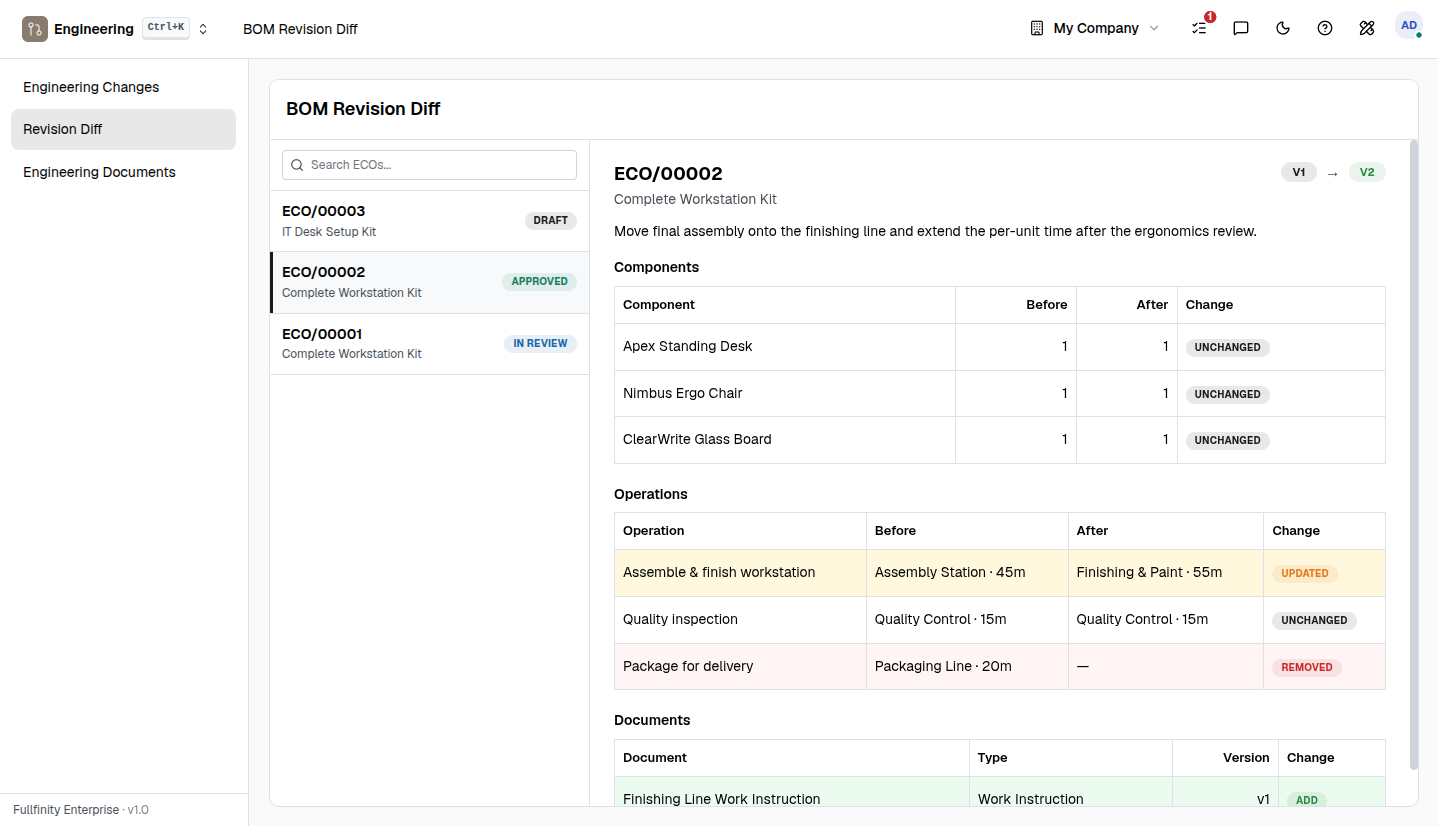
See exactly what changed.
A side-by-side revision diff shows every component and operation before and after — what was added, removed or re-quantified — before you ever approve it.
The floor always builds the right version.
Each revision carries an effectivity window, so a manufacturing order pulls the version in force on its own date — not last week's, not next month's.
Drawings and specs move with the change.
Drawings, specifications, CAD, work instructions and certificates are versioned against the revision and released with the change order — never a stale PDF on the line.
One connected system
The same customers, products and stock run through Engineering Change (PLM) and every other app — nothing kept in a separate tool.
Open-core
The core apps are open source, and the whole thing is yours to self-host.
Free, unlimited users
Self-host the Free edition with your whole team on it — no per-seat fees, no seat counting, no trial running out.
Only what you need
Run Engineering Change (PLM) on its own, and switch on the rest of the suite when you're ready.
PLM software, answered.
How is this different from just editing the bill of materials?+
Engineers never edit a BOM by hand — they hold read-only access to it. Every change is proposed on an engineering change order, reviewed, approved, and only then applied. Applying clones the BOM to a new revision automatically, so the change is captured as an auditable change instead of overwriting the build in place.
What happens to the old revision when a change is applied?+
It is superseded, not deleted. The prior revision is stamped with an end date and kept; the new revision becomes active from its effective date. You keep the full history of every version the product ever had.
Do I have to run a formal approval step?+
A change order already moves through Draft, In Review and Approved before it can be applied. If you need enforced multi-party sign-off, add the Approvals app and the change simply cannot be applied until it is signed off — no extra setup on the engineering side.
Which editions include Engineering Change (PLM)?+
It is part of the Standard and Enterprise editions, and it builds on Manufacturing. Whichever way you run it, the Free edition is free to self-host and your data stays yours to export.
Apps that pair with Engineering Change
Run Engineering Change — and the rest of your business — in one place.
Join the waitlist and be first through the door when Fullfinity launches.
Join the waitlist