The job gets done where there's no signal.
Your technicians finish the job on the plant floor, and everything they logged is waiting for you back at the desk — no signal required.
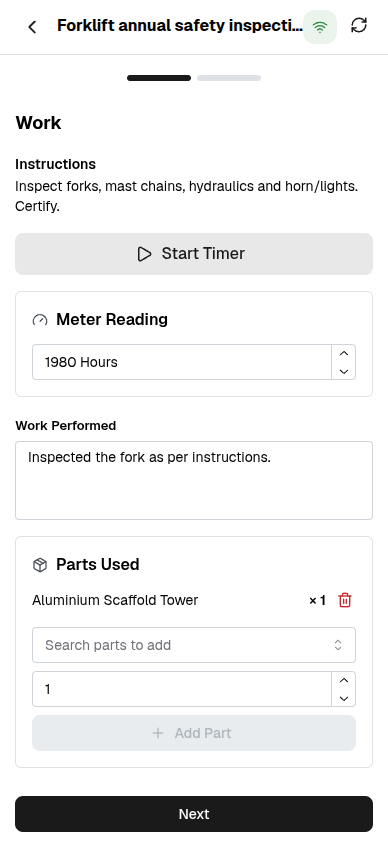

The work happens in a basement. The paperwork happens hours later.
Plant rooms and mechanical basements have no signal, so the timer, the meter reading and the notes get scribbled on a card — and re-keyed at a desk at the end of the shift, if they make it back at all. Hours get rounded. Readings go missing. Nobody can prove the job was actually finished.
Capture it on the floor. It arrives when you resurface.
Your assigned requests are already on the device before you go down. Everything you capture — the timer, the reading, the photos, the sign-off — is held on the phone and synced when a connection returns, without a double-up if it retries.
The clock books the hours nobody would have logged.
Start the timer when you pick up a wrench, stop it when you're done, and the real time on the job is booked against the request — separate from the estimate, so what a repair truly costs stops being a guess.
The meter reading lands on the equipment, not a scrap of paper.
Punch in the hours or cycles off the machine in front of you and it's recorded against that equipment — so the usage-based service plans that ride on the meter keep counting from a number you actually took.
A job can't be signed off until it's actually shown.
Require a proof photo, a technician signature, or both, before a request can move to a closing stage. The Workbench blocks the sign-off without them — and the server blocks it again, so the rule holds even if the app is bypassed.
One connected system
The same customers, products and stock run through Maintenance Workbench and every other app — nothing kept in a separate tool.
Open-core
The core apps are open source, and the whole thing is yours to self-host.
Free, unlimited users
Self-host the Free edition with your whole team on it — no per-seat fees, no seat counting, no trial running out.
Only what you need
Run Maintenance Workbench on its own, and switch on the rest of the suite when you're ready.
Maintenance Workbench software, answered.
Does it really work with no signal?+
Yes. A technician opens their assigned requests, runs the timer, captures meter readings, notes, photos and a sign-off entirely offline. Everything queues on the device and syncs the moment a connection returns.
What happens if a job syncs twice?+
Nothing doubles up. Each captured visit carries its own tag, so a retried or twice-synced job is recognised and skipped — hours are never booked twice and readings are never duplicated.
Can I force proof before a job is closed?+
Yes. Require a proof photo, a technician signature, or both, and a request cannot be signed off from the Workbench until they are attached — enforced on the device and again on the server.
Which plans include the Workbench?+
The Maintenance Workbench is an Enterprise app that sits on top of Maintenance. Maintenance itself — equipment, requests and preventive plans — is free in every edition.
Apps that pair with the Workbench
Run the Workbench — and the rest of your business — in one place.
Join the waitlist and be first through the door when Fullfinity launches.
Join the waitlist