Never roster someone who can’t be there.
Build the week on one board where every clash shows itself — availability and approved leave already shaded in. Publish when it’s ready, not before.
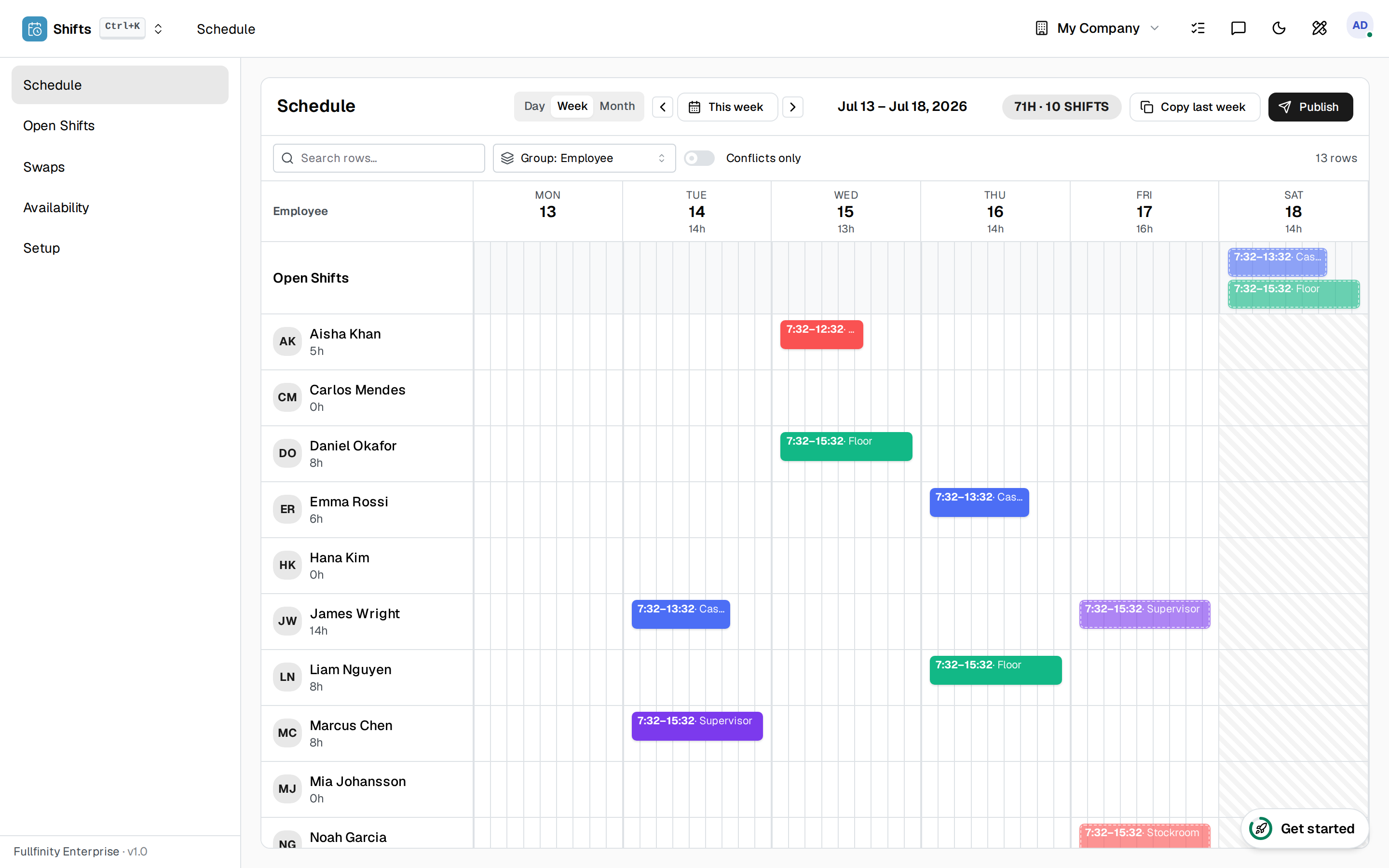

Everyone’s week, on one board.
Your people down the side, the week across the top, shifts in the cells. The hours each person can’t work are already greyed out — from their work schedule, approved leave and any unavailability they’ve declared — and open shifts wait in their own row until you fill them.
A roster that keeps you honest.
A clash is impossible to miss.
Drop a shift on a day someone’s on leave, already booked, or has blocked off, and it flags on the spot — no cross-checking a leave list by hand.
Open shifts fill themselves.
Leave a shift unassigned and your team bids for it. Accept the one you want and the rest decline automatically — and anyone who can’t work it can’t bid in the first place.
Cover sorts itself out.
Someone needs a night off? They offer their shift for swap, a colleague claims it, you approve — and only a colleague free to work it can take it on.
Draft in private. Publish in one move.
The week is your working copy until you say so. When it’s ready, publish the whole thing at once — and everyone rostered is notified of their shifts, so no one turns up to a schedule they never saw.
One connected system
The same customers, products and stock run through Employee Scheduling and every other app — nothing kept in a separate tool.
Open-core
The core apps are open source, and the whole thing is yours to self-host.
Free, unlimited users
Self-host the Free edition with your whole team on it — no per-seat fees, no seat counting, no trial running out.
Only what you need
Run Employee Scheduling on its own, and switch on the rest of the suite when you're ready.
Employee scheduling software, answered.
How is this different from a shared calendar or a spreadsheet?+
A spreadsheet does not know who is off. Here every person’s non-working time is shaded straight from their work schedule, approved leave and any unavailability they have declared — and any shift that lands in it flags as a clash. You never quietly roster someone who was never available.
What stops me scheduling someone who cannot be there?+
A shift dropped on a day the employee is on approved leave, has blocked off, or already has another shift is marked as a conflict the moment it happens — and the same rule stops them bidding on or claiming a shift they cannot work.
Can staff pick up and hand off shifts themselves?+
Yes. Leave a shift open and your team bids for it — you accept the one you want and the rest decline automatically. Or an employee offers their own shift for a colleague to claim, and you approve the hand-off. Either way, anyone who cannot actually work it is blocked.
What happens to my data?+
It stays yours. Export it whenever you like — the roster, the shifts, the whole history are your records, not something locked behind a vendor.
Apps that pair with Employee Scheduling
Run Employee Scheduling — and the rest of your business — in one place.
Join the waitlist and be first through the door when Fullfinity launches.
Join the waitlist