The warehouse runs on scans, not keystrokes.
Scan every move on the floor and watch stock match reality — receive, pick and count on a phone, no keying, no end-of-day surprise.
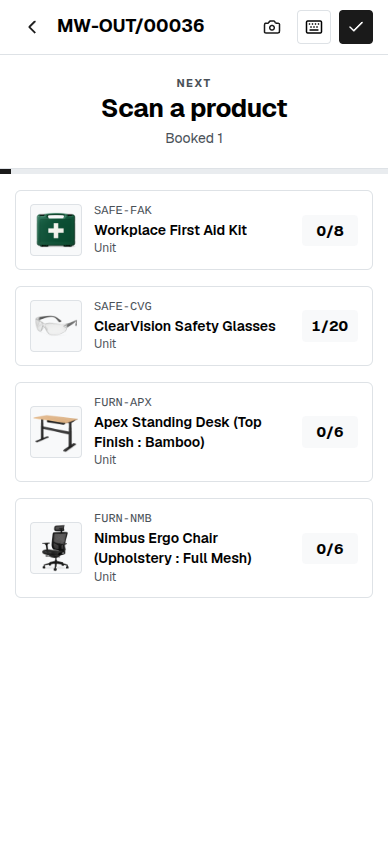

The count on the floor. The count in the system. Never the same number.
Goods get picked on paper, and someone keys it in later — or a separate scanner tool syncs to your stock overnight and the two quietly disagree by morning. Every extra step between the shelf and the record is a place for a unit to go missing.
A scan is the stock move — not a note about one.
Point the camera at a product and it lands on the right line of the picking, with a beep to confirm. Validate at the end and the goods actually move — reservations release, cost layers settle and traceability is written — the same as a careful edit at a desk, only done from the aisle.
The same scanner receives, delivers and puts away.
You don't learn a new tool per task. The screen adapts to the operation in front of it — a putaway asks the operator to scan where it lands, a pack job asks for the box to pack into, a tracked line asks for the lot. One flow, shaped by the job.
Scan a serial twice and it stops you.
Capture a lot or serial with the same scan that books the unit, and if that serial has already gone onto the transfer, the scanner refuses it with an error tone — so the same unit can't be received or shipped twice. A GS1 label that carries the lot and quantity together is read in one pass.
One connected system
The same customers, products and stock run through Barcode and every other app — nothing kept in a separate tool.
Open-core
The core apps are open source, and the whole thing is yours to self-host.
Free, unlimited users
Self-host the Free edition with your whole team on it — no per-seat fees, no seat counting, no trial running out.
Only what you need
Run Barcode on its own, and switch on the rest of the suite when you're ready.
Barcode warehouse software, answered.
How is this different from a standalone barcode scanner app?+
A standalone scanner still has to sync what it counts back to your stock system, and the two drift. Here the scan books straight into the same inventory the rest of your business runs on — what you scan on the floor is the stock level, with no separate system to reconcile.
What hardware does it need?+
A phone or tablet is enough — it scans with the device camera right in the browser, and it works with a hardware wedge scanner too. It is one fullscreen screen built for a thumb, not a keyboard.
Which warehouse jobs does it handle?+
Receiving, deliveries, internal moves and putaway all run from the same screen, shaped by the operation — plus batch and wave picking that walk the pick list in order, and inventory counts done by scan.
Which plans include Barcode?+
Barcode is part of the Standard and Enterprise plans. Inventory itself — stock, moves and transfers — is included free in every edition.
Apps that pair with Barcode
Run Barcode — and the rest of your business — in one place.
Join the waitlist and be first through the door when Fullfinity launches.
Join the waitlist